
How Novelcrafter Tracks Content Performance in Google Analytics
Learn how Novelcrafter integrates with Google Analytics to track AI content performance, measure ROI, and optimize publishing workflows for B2B marketing teams.

Connect your AI writing workflow to GA4 so you can measure which Novelcrafter-generated content actually drives traffic, engagement, and conversions.
Novelcrafter Google Analytics integration lets you move beyond word counts and finish-line metrics to understand how your AI-assisted content performs with real readers. This walkthrough shows you how to set up tracking, configure custom events for AI-generated articles, and build a dashboard that reveals whether your Novelcrafter workflow is producing material that ranks, engages, and converts. You will leave with a working GA4 property, tagged content, and a repeatable measurement framework.
Before You Begin
This guide is for content operators, marketing leads, and agency owners who publish AI-assisted content through Novelcrafter and want to close the loop between production and performance. You should already have a Novelcrafter account with active projects and a Google Analytics 4 property (or the ability to create one). We cover GA4 configuration, UTM tagging for Novelcrafter exports, custom event setup, and dashboard building. We do not cover Universal Analytics migration, e-commerce tracking, or advanced attribution modeling. Expect 45-60 minutes for initial setup and 15 minutes for ongoing monthly review.
What you need:
A Novelcrafter account with at least one completed manuscript or article
Google Analytics 4 property with Editor or Admin access
Google Tag Manager (recommended but optional)
Basic familiarity with markdown exports and URL parameters
The prerequisite most people miss: GA4's default content grouping does not distinguish AI-generated from human-written material. You must set a custom dimension before publishing, or your Novelcrafter content will blend into undifferentiated traffic.
Success Checks
GA4 shows a custom dimension "Content Source" with values including "novelcrafter"
At least one Novelcrafter export URL includes UTM parameters identifying the project
A GA4 exploration report filters sessions where Content Source = novelcrafter
You can compare average engagement time between Novelcrafter and non-Novelcrafter content
Your dashboard updates automatically when new tagged content goes live
Step 1: Configure a Custom Dimension for AI Content Source
GA4 does not natively flag which articles originated from AI writing tools. Without this dimension, your Novelcrafter content becomes invisible in performance reports, making it impossible to calculate true ROI on your AI writing investment. Skipping this step means you will compare AI and human content manually through spreadsheets forever.
Open GA4 Admin → Custom Definitions → Create Custom Dimension
Set scope to "Event" and name it
content_sourceAdd "novelcrafter" as the first dimension value; reserve "human," "hybrid," and "imported" for future use
Note the dimension's API name (typically
customEvent:content_source)
Expected result: Your GA4 property shows an active custom dimension with API name customEvent:content_source and status "Active within 24-48 hours."
Verify: Navigate to Configure → Custom Definitions and confirm content_source appears in the list with scope "Event" and no errors.
Common Pitfall: Creating a user-scoped dimension instead of event-scoped. User scope would attribute all future sessions to Novelcrafter once a reader hits one AI article, destroying your data. If you see "User" in the scope column, delete and recreate with "Event" selected.
Step 2: Export and Tag Your Novelcrafter Content with UTM Parameters
Novelcrafter generates clean markdown and HTML exports, but these carry no tracking identifiers by default. You must append UTM parameters before publishing to preserve the connection between your Novelcrafter project and GA4 session data. Without tagging, traffic appears as direct or organic with no content-source attribution.
In Novelcrafter, complete your manuscript or article and export to HTML or markdown
Before uploading to your CMS, append this UTM string to all internal links:
?utm_source=novelcrafter&utm_medium=ai_content&utm_campaign=[project-slug]&utm_content=[chapter-or-section]Replace
[project-slug]with your Novelcrafter project name (lowercase, hyphenated)Replace
[chapter-or-section]with the specific section identifier for granular trackingFor the canonical page URL itself, use a meta tag or data attribute rather than UTM parameters to avoid SEO dilution
Expected result: Every Novelcrafter-generated article contains trackable links, and your CMS publishes the content with the content_source dimension ready to fire.
Verify: Open a published article in incognito mode, inspect the page source, and confirm UTM parameters appear on internal links. Use the GA4 DebugView to confirm content_source fires with value "novelcrafter" on page load.
Common Pitfall: Applying UTM parameters to the canonical URL itself, which fragments your SEO signals across duplicate URLs. Always keep the canonical clean; append UTMs only to navigation links, CTAs, and promotional placements within the article body.
Step 3: Implement the Content Source Event in Google Tag Manager
With your custom dimension defined and content tagged, you now need GA4 to actually record the dimension value when Novelcrafter content loads. Google Tag Manager provides the cleanest implementation, though you can also hardcode a gtag event if you manage tags directly.
In GTM, create a new tag of type "Google Analytics: GA4 Event"
Set the event name to
page_view(or create a custom eventcontent_loadedif you want separation from standard pageviews)Add an event parameter
content_sourcewith value "novelcrafter"Create a trigger that fires on "Page View" where Page URL contains
utm_source=novelcrafterOR where DOM element[data-content-source="novelcrafter"]existsPublish the GTM container
Expected result: Every page load of Novelcrafter-tagged content sends a content_source parameter with value "novelcrafter" to GA4.
Verify: Use GTM Preview mode on a live Novelcrafter article. Confirm the tag fires and the event parameter shows content_source: novelcrafter in the debug panel.
Common Pitfall: Triggering on URL contains "novelcrafter" rather than the UTM parameter. If your CMS generates auto-slugs that include "novelcrafter" in the path, you will over-report. Always trigger on the explicit UTM or data attribute, never the domain or slug pattern.
Step 4: Build a Novelcrafter Performance Exploration in GA4
Raw event data means little without a structured view. GA4 explorations let you isolate Novelcrafter content and compare it against your baseline. This step creates a reusable report template that answers whether your AI workflow is improving or degrading over time.
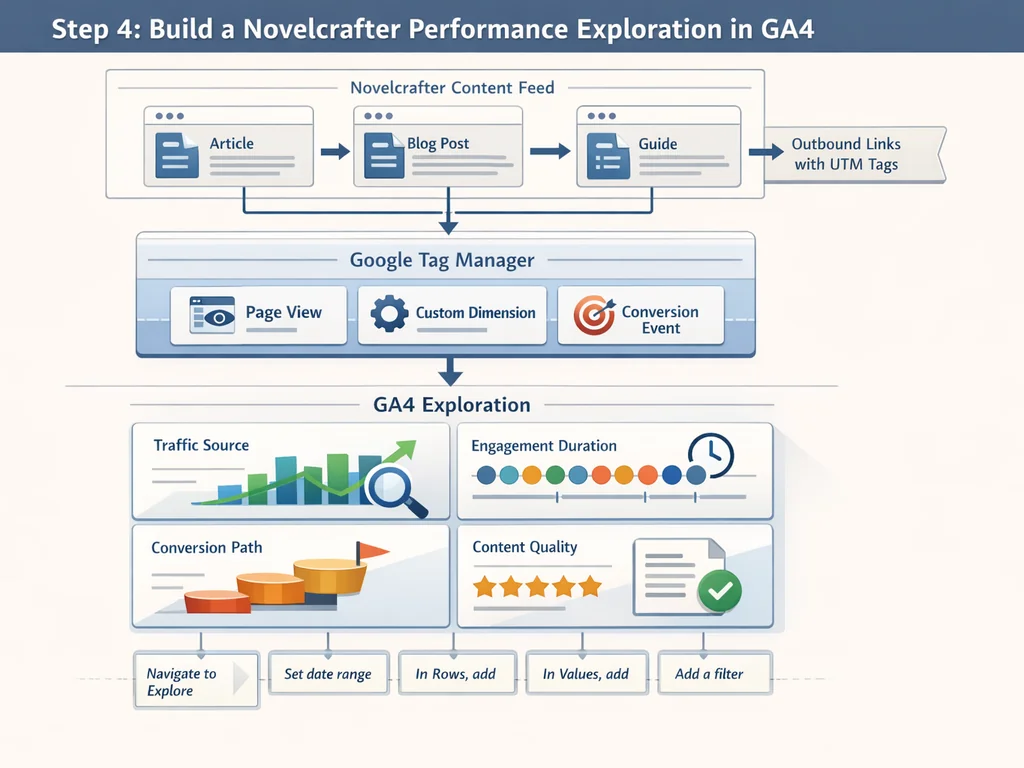
Navigate to Explore → Free Form → Create New
Set date range to "Last 90 days" with comparison to previous period
In Rows, add "Page title" and "Content source" (your custom dimension)
In Values, add "Sessions," "Average engagement time," "Conversions," and "Event count"
Add a filter:
content_sourceexactly matches "novelcrafter"Duplicate the tab, remove the filter, and rename it "All Content Baseline"
Save the exploration as "Novelcrafter Content Performance"
Expected result: Two exploration tabs showing Novelcrafter-specific metrics and site-wide baselines for direct comparison.
Verify: Open both tabs and confirm the Novelcrafter tab shows fewer sessions but comparable or better engagement time. If engagement time is significantly lower, your content may need structural revision before scaling production.
Common Pitfall: Forgetting to enable the "Content source" dimension in exploration settings. GA4 hides custom dimensions by default in explorations; click the "+" next to Dimensions and search for your
content_sourcename to activate it.
Step 5: Create Automated Alerts for Content Quality Thresholds
Measurement without action is vanity. Set GA4 to notify you when Novelcrafter content underperforms your human-written baseline, so you can intervene before publishing volume compounds a quality problem.
In GA4, navigate to Admin → Property Settings → Data Display → Insights → Create Custom Insight
Set condition: Average engagement time < [your human baseline, e.g., 2:30] AND Content source = novelcrafter
Set frequency: Weekly email to your content operations lead
Create a second insight for: Conversions = 0 AND Sessions > 100 AND Content source = novelcrafter (high traffic, zero conversion indicates misalignment with search intent)
Expected result: Weekly automated emails flag Novelcrafter articles that need review, without manual report checking.
Verify: Temporarily lower the engagement time threshold to below your current Novelcrafter average, save, and confirm a test insight triggers within 24 hours. Reset to your actual baseline after verification.
Common Pitfall: Setting thresholds based on site-wide averages rather than content-type-specific baselines. A 90-second engagement time may signal failure for a 3,000-word guide but success for a product announcement. Segment your baselines by content format before building alerts.
Step 6: Document Your Novelcrafter-to-GA4 Workflow for Team Handoffs
Solo operators can remember setup details, but teams scale through documentation. A written workflow prevents the common scenario where one person configures tracking, leaves, and the next publisher unknowingly strips UTM parameters or mislabels content sources. Your documentation should cover the exact export settings in Novelcrafter, the UTM parameter template, the GTM container version, and who holds GA4 Admin access.
Create a shared document titled "Novelcrafter GA4 Tracking Protocol" with sections for each step above
Include screenshots of your GTM tag configuration, trigger conditions, and the custom dimension definition
List the exact UTM parameter order:
utm_source=novelcrafter&utm_medium=ai_content&utm_campaign=[project-slug]&utm_content=[chapter-or-section]Name a primary owner for the GA4 property and a backup with Editor rights
Schedule quarterly reviews to verify the custom dimension still fires correctly after Novelcrafter or GA4 updates
Expected result: Any team member can publish Novelcrafter content with correct tracking in under 10 minutes, without asking the original configurator.
Verify: Ask a colleague who did not set up the system to publish a test article and confirm the content_source dimension appears in GA4 DebugView within 30 minutes.
Common Pitfall: Documenting only the happy path and omitting the troubleshooting section. When Novelcrafter updates its export format or GA4 changes custom dimension behavior, your team needs the fix, not just the setup. Include the three most common failure modes from the Troubleshooting section in your protocol document.
Step 7: Validate Data Accuracy with Controlled A/B Tests
Once your tracking infrastructure is operational, you need confidence that the numbers reflect reality, not instrumentation artifacts. Run a controlled test comparing a Novelcrafter-generated article against a human-written piece on the same topic, published within the same week, with identical promotion. This isolates content quality from distribution effects.
Select a topic where you have both a Novelcrafter draft and a human-written version of comparable length and structure
Publish both articles with identical UTM parameters except
utm_content, which should be "novelcrafter-ab" and "human-ab"Suppress both from your main navigation and email newsletter to control for traffic source
Drive traffic through a single paid social post or newsletter slot split 50/50 between the two URLs
Compare engagement time, scroll depth, and conversion rate after 7 days or 200 sessions per variant
Expected result: Statistically meaningful data on whether Novelcrafter content performs equivalently to human content for your specific audience and topic type.
Verify: Check that both variants received similar session counts. If one variant has fewer than 80% of the other's sessions, your traffic split was uneven and the engagement comparison is invalid. Re-run with a more controlled distribution mechanism.
Common Pitfall: Declaring victory or defeat on small sample sizes. With fewer than 100 sessions per variant, random variation dominates. Novelcrafter content that "wins" by 15% with 60 sessions each is not proven superior; it is noise. Set a minimum sample size before running the test and stick to it.
Troubleshooting: Common Mistakes and Fixes
Novelcrafter content appears as "direct" traffic in GA4. This happens when UTM parameters strip during CMS import or redirect chains. Fix by auditing your publish flow: export from Novelcrafter → check URL in CMS draft → verify live URL preserves parameters → test with GA4 DebugView. If your CMS strips parameters, switch to data attributes and GTM DOM-based triggering instead.
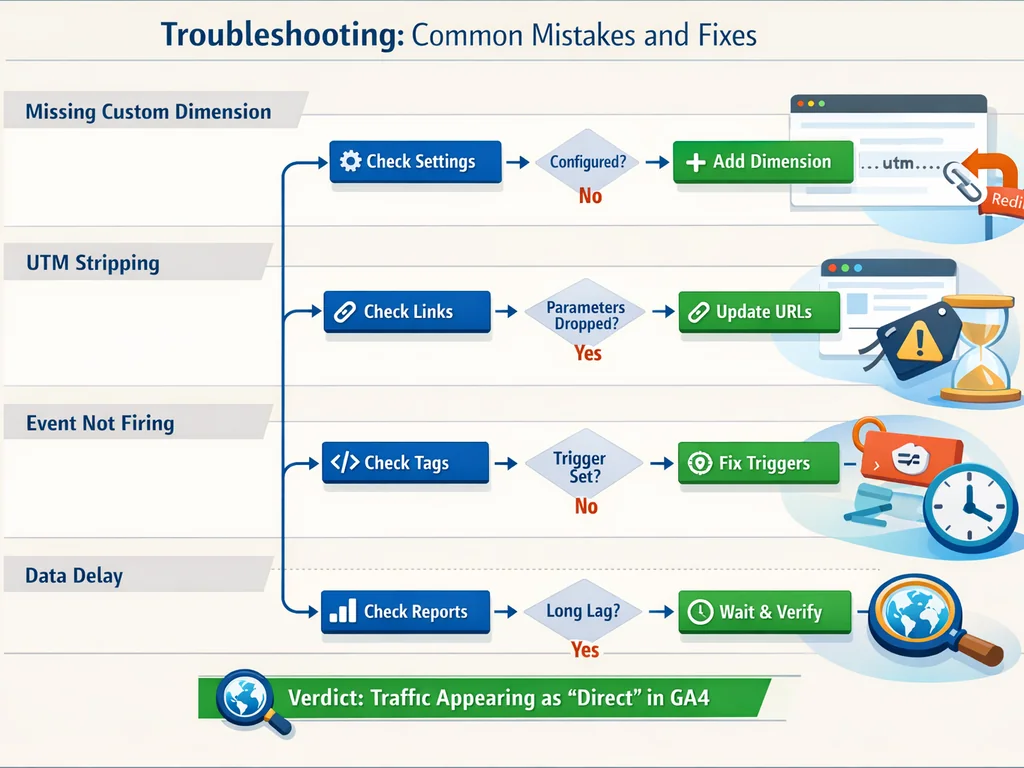
Custom dimension shows "not set" for all Novelcrafter pages. The dimension was likely created after the GTM tag was published, or the tag fires before the data layer populates. Fix by adding a 500ms delay to your GTM trigger using a timer, or by pushing content_source into the data layer before the GA4 configuration tag fires.
Engagement time looks artificially high for Novelcrafter content. AI-generated articles sometimes produce "pogo-sticking" behavior where readers scroll slowly but do not convert, inflating engagement without value. Fix by adding scroll-depth events at 25%, 50%, 75%, and 90%, then recalculate engagement time only for sessions reaching 50%+ depth. If shallow scroll correlates with high time, your content may be verbose rather than valuable.
UTM parameters break internal site search or pagination. When Novelcrafter links carry UTMs through to search results or page 2, your analytics fragment sessions. Fix by configuring your CMS or application router to strip UTMs after the initial landing and store attribution in sessionStorage or a first-party cookie.
Novelcrafter project names leak into public URLs through UTM campaigns. Sloppy campaign naming exposes internal project codes. Fix by mapping Novelcrafter project slugs to public campaign names in a GTM lookup table, so project-alpha-thriller becomes q3-fiction-launch in GA4 reports.
GA4 exploration shows zero data for Novelcrafter content despite confirmed tag firing. This typically occurs when the exploration date range predates your custom dimension activation. GA4 does not retroactively apply custom dimensions; data collection begins only after the dimension status shows "Active." Fix by adjusting your exploration start date to the day after dimension creation, or wait 24-48 hours if you just configured it.
Verify the Result
Return to your Success Checks and confirm each passes:
Custom dimension active: In GA4 Admin → Custom Definitions,
content_sourceshows "Active" with event scope and no data quality warnings.UTM-tagged exports: Spot-check three Novelcrafter articles published in the last 30 days; all contain
utm_source=novelcrafteron primary CTAs or internal links.Exploration filter working: Your "Novelcrafter Content Performance" exploration shows data when filtered to
content_source = novelcrafter, and the comparison tab shows different numbers for all content.Engagement comparison: Average engagement time for Novelcrafter content is within 15% of your human-written baseline, or you have documented why variance is acceptable (e.g., different content formats).
Dashboard automation: New Novelcrafter articles appear in your exploration within 48 hours of publication without manual import or report refresh.
If any check fails, return to the corresponding step. Most failures stem from GTM publish delays (wait 24 hours), CMS parameter stripping (audit Step 2), or dimension scope mismatches (recreate in Step 1).
How SiaSEO Helps
Tracking Novelcrafter content in GA4 is necessary but not sufficient. The larger challenge is ensuring your AI-generated material meets quality thresholds before it ever reaches analytics. SiaSEO's autonomous content generation platform analyzes your site context before writing, then scores every article for semantic coherence and search intent alignment before publishing. Where Novelcrafter excels at manuscript and long-form production, SiaSEO closes the loop with explicit quality scoring and automated publishing that respects your CMS structure. Teams using both tools can route Novelcrafter drafts through SiaSEO's validation layer, ensuring only content that passes structural and semantic checks gets tagged, tracked, and measured in GA4. This prevents the common failure mode where high-volume AI publishing floods your analytics with underperforming pages that dilute domain authority.
Consider a marketing team publishing 20 articles monthly through Novelcrafter. Without pre-publication validation, they might discover through GA4 after six weeks that 40% of AI content scores below their engagement baseline. With SiaSEO's quality scoring integrated into the workflow, those underperforming drafts get flagged before publication, saving the team from polluting their analytics with content that was structurally flawed from export. The result is cleaner data, more reliable A/B tests, and a GA4 property that reflects genuine content performance rather than volume-driven noise.
Next Steps
With Novelcrafter content now visible in GA4, extend your measurement in three directions. First, connect Google Search Console to your GA4 property and add "Search query" as a secondary dimension in your Novelcrafter exploration, revealing which search terms actually drive traffic to AI-generated pages. This bridges the gap between production source and discovery mechanism, showing whether Novelcrafter content ranks for intended keywords or attracts accidental traffic that bounces.
Second, implement a content decay alert: flag Novelcrafter articles whose 30-day session average drops 20% below their 90-day baseline, triggering editorial refresh workflows. Content decay is normal, but AI-generated material can decay faster if it lacks original research or unique perspective. Catching decline early lets you update or retire pages before they become negative SEO signals.
Third, if you manage multiple writers or AI tools, expand your content_source dimension to include "novelcrafter-v2," "human-senior," and "human-junior" values, enabling true comparative ROI analysis across your entire content production stack. This granularity reveals not just whether AI works, but which AI configurations, prompt strategies, or human editors produce the highest-return content for your specific domain.
References
novelcrafter Docs — Documentation - Novelcrafter Help Learn about each feature in Novelcrafter in detail and how to use them effectively. This section provides detailed information about
Glossary of Terms — Glossary of Terms | Reference - Novelcrafter # Glossary of Terms A collection of terms and concepts you might encounter while using Novelcrafter or your writing journey. 1.
Description Guidelines — Description Guidelines - Codex - Novelcrafter Help # Description Guidelines ## How long should a description be? no single right answer it depends on the AI model you are
Related Blog Posts
Why 94 Percent Business Blogs Fail — Understand the structural patterns that doom content programs before measurement even begins
Semantic Coherence Scoring Explained — Learn how to evaluate AI content quality with the same rigor you apply to traffic metrics
Compounding Effect Daily Publishing — Build the publishing velocity that makes granular analytics tracking worthwhile