
Run an SEO Site Check That Google Analytics Won't Show You
Learn how to run a full SEO site checker audit that catches what Google Analytics ignores: crawl errors, index issues, and speed gaps.

A client called last month with a puzzle. Their Google Analytics dashboard showed healthy traffic, steady session duration, and conversion rates that looked fine. Yet their organic visibility had dropped 34% since March. The March 2026 Core Update had passed them by without a warning flag in GA4. Something was broken that their analytics could not see.
This is the blind spot that sends experienced marketing teams in circles. Google Analytics tells you what happened after someone arrived. It does not tell you whether Googlebot could crawl the page, whether your mobile layout triggered a usability penalty, or whether your structured data had silently failed. Those signals live in a different layer of your stack, and they require a dedicated audit workflow to surface.
This guide walks through a complete site check using an SEO site checker alongside your existing GA data. You will learn which technical issues analytics cannot catch, how to cross-reference findings with Search Console, and how to prioritize fixes that actually move rankings. The workflow fits teams running weekly audits or founders doing their first technical sweep.
What Google Analytics Actually Sees
Google Analytics 4 tracks user behavior after the page loads. It records sessions, events, conversions, and engagement time. It does not record whether the page loaded for a crawler, whether the mobile viewport rendered correctly, or whether your breadcrumb schema triggered a rich result.
This matters because Google's index operates on two tracks. The first track is crawling and indexing: can Googlebot discover, fetch, and parse the page? The second track is ranking and serving: does the page satisfy the query? GA4 only measures the second track, and only for users who successfully arrived. If Googlebot hits a 403 on your product category page, GA4 sees zero traffic and reports nothing unusual. The failure is invisible.
The March 2026 Core Update reinforced this split. Per SEO Francisco's analysis, winners were sites with clean technical foundations and original information architecture. Losers often had strong user metrics but degraded crawl efficiency or outdated structured data. Google's systems now weight technical quality signals more heavily in core updates, and those signals do not appear in your GA4 dashboard.
What an SEO Site Checker Surfaces Instead
An SEO site checker crawls your site as a search engine would. It evaluates technical infrastructure, on-page elements, and indexability rules that GA4 ignores. The specific gaps fall into four categories.
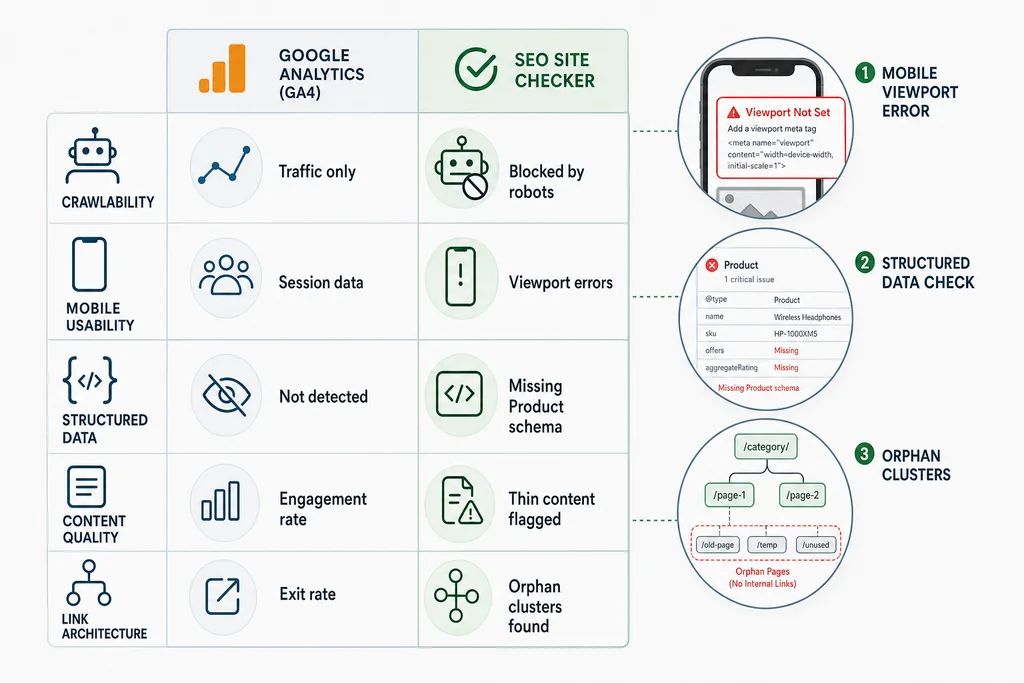
Crawlability and Index Control
Googlebot follows links and obeys directives in your robots.txt and meta robots tags. If your CMS generates conflicting signals, Googlebot may skip pages that should rank. An SEO site checker flags:
- Pages blocked by robots.txt that receive external backlinks
- Meta robots "noindex" tags on pages with organic traffic potential
- Redirect chains longer than three hops
- 5xx server errors on high-priority URLs
These issues do not affect user experience directly. A visitor clicking from your email newsletter reaches the destination fine. But Googlebot abandons redirect chains and drops noindex pages from the index entirely. Your GA4 traffic looks stable while your search footprint shrinks.
The Government digital experience standards emphasize that controlling search engine crawling through proper robots.txt and sitemap protocols is foundational to discoverability. Without this layer, content quality becomes irrelevant.
Mobile Usability and Core Web Vitals
GA4 reports device categories and session duration. It does not report whether your mobile layout passes Google's usability thresholds. An SEO site checker tests:
- Viewport configuration and tap target sizing
- Content wider than the mobile screen
- Interstitial penalties from intrusive overlays
- LCP, INP, and CLS scores against the 75th percentile threshold
Since March 2026, mobile-first indexing is the only indexing. If your mobile rendering breaks, your rankings break regardless of desktop performance. GA4 will show mobile sessions dropping, but it will not tell you why or how to fix it.
Structured Data and Rich Result Eligibility
Schema markup powers rich snippets, product carousels, and local business panels. GA4 tracks clicks from those results but cannot validate whether your markup is correct, complete, or eligible. An SEO site checker verifies:
- Required properties for your schema type
- Nested entity relationships
- Syntax errors that invalidate the JSON-LD
- Alignment between page content and markup claims
The Digital.gov advanced SEO guidance notes that semantic elements and structured data help search engines understand page context. Without validation, you may be serving markup that looks correct but fails silently in Google's testing tools.
Content Quality and Internal Link Architecture
GA4 measures engagement on pages that exist. It does not flag thin content, duplicate clusters, or orphaned pages with no internal links. An SEO site checker maps:
- Pages with duplicate or near-duplicate title tags
- Content below a word-count threshold for its intent type
- Orphaned pages with zero internal links
- Broken internal links that waste crawl budget
Google's April 2026 spam update specifically targeted self-serving listicles and thin content generated at scale. Per Barry Schwartz's webmaster report, Google warned against publishing content that lacks original value. An audit catches these patterns before they trigger manual actions.
Setting Up Your Audit Stack
Before running the workflow, gather three tools. You likely have two already.
Google Search Console is free and mandatory. It provides the crawl stats, index coverage, and Core Web Vitals data that no third-party tool can match. Export the last 16 months of data if possible.
An SEO site checker fills the gaps. Free options include Screaming Frog (up to 500 URLs), Google Lighthouse, and the Search Console URL Inspection tool. Paid platforms add scheduled monitoring and historical comparison. Choose based on crawl frequency and team size.
A spreadsheet or project tracker keeps findings actionable. Group issues by severity, affected URL count, and estimated fix time.
The Audit Workflow: Six Steps
This workflow assumes a mid-size site with 1,000 to 50,000 URLs. Adjust crawl scope for larger sites.
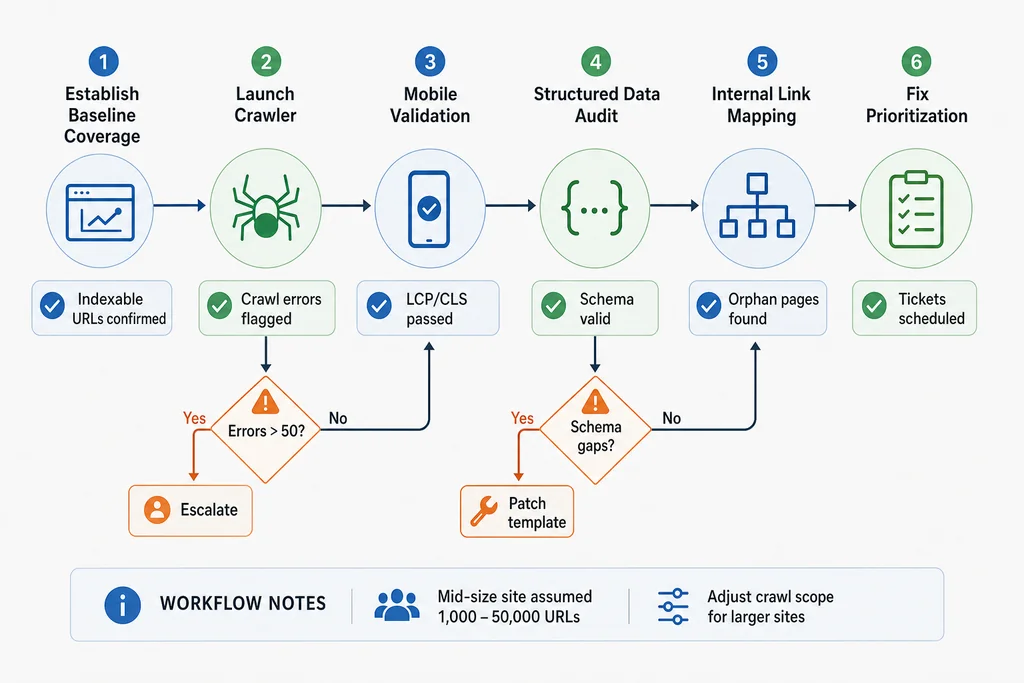
Step 1: Establish Baseline Coverage in Search Console
Open Google Search Console and navigate to Pages in the indexing report. Note the counts for:
- Valid pages indexed
- Valid with warnings
- Excluded by robots.txt or noindex
- Not indexed due to crawl anomalies or soft 404s
Export this snapshot with today's date. You will compare against it after fixes deploy. If your valid indexed count dropped sharply around the March 2026 Core Update, that is your first signal that technical debt caught up with you.
Step 2: Run the SEO Site Checker Crawl
Configure your SEO site checker to crawl your full domain, respecting robots.txt. Set the user-agent to Googlebot Smartphone if the tool allows it. After completion, export:
- All 4xx and 5xx errors
- All redirect chains
- All pages with meta robots noindex
- All pages missing canonical tags or with self-referencing canonicals
- All pages with title tags or meta descriptions below best-practice length
Cross-reference the 5xx errors against your server logs. A spike in server errors often correlates with a deployment, plugin update, or hosting issue that GA4 cannot isolate.
Step 3: Validate Mobile Rendering and Core Web Vitals
Run Lighthouse on your top 20 traffic URLs from GA4. Record LCP, INP (replacing FID in 2026), and CLS for each. Then check the same URLs in Search Console's Core Web Vitals report.
If Lighthouse flags a URL as "Needs Improvement" but Search Console marks it "Good," trust Search Console. It uses real Chrome User Experience data, not lab simulation. If both flag issues, prioritize by traffic volume and business value.
Test mobile rendering specifically. Use Chrome DevTools device emulation or Google's Mobile-Friendly Test. Look for:
- Text that requires horizontal scrolling
- Buttons too close together for touch targets
- Content hidden behind accordions that Googlebot may not expand
Step 4: Audit Structured Data for Critical Page Types
Identify your three to five most important page templates. For an e-commerce site, this might be product detail, category, and blog post. For a local service business, it might be homepage, service area, and contact.
For each template, run the URL through Google's Rich Results Test and your SEO site checker's schema validator. Check:
- Does the markup match the visible page content?
- Are all required properties present for the target rich result type?
- Is the JSON-LD syntactically valid with no trailing commas or unclosed objects?
Common failures in 2026 include outdated Product markup missing the hasMerchantReturnPolicy field, and LocalBusiness markup with incorrect @id references. These are quick fixes with immediate eligibility impact.
Step 5: Map Internal Link Health and Content Clusters
Export your internal link graph from the SEO site checker. Identify:
- Orphaned pages with zero incoming internal links
- Pages with only one incoming link buried deep in the architecture
- Broken internal links returning 404s
- Anchor text patterns that over-optimize exact-match keywords
For orphaned pages, decide whether to add internal links, consolidate the content elsewhere, or noindex if it no longer serves a purpose. For broken links, fix or remove them. Each broken link wastes crawl budget and degrades user trust.
Check your content clusters against the internal linking topical cluster guide. Strong clusters use hub pages with contextual links to related spokes, not generic footer navigation.
Step 6: Prioritize and Schedule Fixes
Score each finding on two axes: severity and effort. Severity measures ranking or traffic risk. Effort measures developer or content time required.
| Severity | Effort | Action |
|---|---|---|
| High | Low | Fix immediately. These are usually redirect chains, broken canonicals, or missing schema properties. |
| High | High | Schedule for next sprint. Examples include Core Web Vitals remediation or site architecture changes. |
| Low | Low | Batch for weekly maintenance. Thin meta descriptions or minor alt text gaps. |
| Low | High | Defer or monitor. Full content rewrites for pages with minimal traffic potential. |
Document the expected outcome for each fix. "Fix 403 on /pricing" should connect to "restore indexation for 12 product pages." This connects technical work to business metrics that stakeholders understand.
A Real Audit Scenario
Maya runs SEO for a B2B SaaS company with 8,000 pages. Her March traffic report from GA4 showed a 12% drop in organic sessions. The executive team wanted to increase content velocity to compensate.
Instead, Maya ran the workflow above. Her SEO site checker revealed that a CMS update in February had appended noindex, follow to all pagination pages. Those pages had been passing link equity to product detail pages for two years. With them deindexed, 340 product pages dropped from ranking positions 5-15 to positions 40+.
The fix took 20 minutes: update the pagination template, remove the rogue meta tag, and request reindexing in Search Console. Within ten days, organic sessions recovered and exceeded the February baseline. GA4 alone would have suggested a content quality problem. The SEO site checker revealed a deployment artifact.
Common Mistakes That Waste Audit Time
Teams new to technical audits often over-invest in low-impact areas. Avoid these patterns.
Chasing perfect scores over business outcomes. A Lighthouse score of 100 is satisfying but unnecessary. A score of 85 with fast LCP on your top 50 URLs beats a score of 100 with slow LCP on pages no one visits.
Auditing without fixing. The value is in the remediation, not the report. Schedule fix time before you start the audit, or the findings sit in a backlog.
Ignoring crawl budget on large sites. If you have 500,000 URLs but Googlebot crawls 10,000 per day, your priority is crawl efficiency, not marginal title tag improvements. Use log file analysis to see where Googlebot actually spends its time.
Treating every issue as urgent. A single 404 from an external blog comment is not urgent. A pattern of 404s from your main navigation is. Look for patterns, not outliers.
When to Escalate to Specialist Tools
The workflow above handles 90% of technical issues. Escalate to specialized tools when you encounter:
- JavaScript rendering failures: use a headless crawler or Google's URL Inspection live test
- International targeting problems: use hreflang validators and geo-specific Search Console properties
- Log file analysis at scale: use Screaming Frog Log Analyzer or Botify
- JavaScript framework-specific issues: use framework debuggers and server-side rendering tests
These tools require more setup but resolve edge cases that general-purpose SEO site checkers miss.
Connecting Audit Findings to Content Strategy
Technical audits and content strategy are not separate workstreams. The same crawl that finds broken links also surfaces content gaps. Look for:
- High-impression, low-click queries in Search Console where the snippet is poorly formatted
- Pages ranking on page two with thin content that competitors cover more thoroughly
- Topics with search volume but no dedicated page in your architecture
The semantic coherence scoring guide explains how to evaluate whether your content clusters maintain topical focus across related pages. Weak coherence dilutes ranking potential even when individual pages are technically sound.
Keeping the Audit Alive
One-time audits deliver one-time value. Build recurring checks into your operations:
- Weekly: monitor Search Console for coverage anomalies and manual actions
- Monthly: run a partial crawl of new and changed pages
- Quarterly: full site crawl with comparison to previous quarter's baseline
- After every deployment: automated smoke test for 5xx errors and critical page rendering
Set alerts in your SEO site checker for threshold breaches. A spike in 404s or a drop in valid indexed pages should notify your team within 24 hours, not at the next scheduled review.
FAQ
How often should I run a full site audit?
Quarterly for stable sites, monthly for sites with frequent deployments or large content operations. After any platform migration, CMS update, or core algorithm update, run an immediate audit.
Can I rely on free tools alone?
For small sites, yes. Google Search Console, Lighthouse, and Screaming Frog's free tier cover the essentials. As you scale, paid tools save time through automation, historical comparison, and team collaboration features.
What's the difference between an SEO site checker and Google Search Console?
Search Console reports what Google sees and how it behaves. An SEO site checker simulates crawler behavior and tests elements that Google may not explicitly report, such as redirect chain length, exact meta tag syntax, and internal link depth.
Why didn't my traffic drop when I had technical issues?
Technical issues often affect discovery of new or long-tail queries before they hit your core traffic. You may see flat or slowly declining growth rather than a sharp drop. By the time GA4 shows a problem, the indexation damage is usually months old.
Should I fix all issues the SEO site checker finds?
No. Prioritize by severity, effort, and business impact. Some flagged issues are informational or apply to pages with no search potential. Focus on issues affecting pages that drive revenue or have clear ranking opportunity.