
Semrush Plans: Pro vs Guru vs Business Pricing & Limits
Compare Semrush Pro, Guru, and Business plans. See 2026 pricing, keyword tracking limits, and feature differences to choose the right tier for your SEO needs.

David, a solo SEO who’d been running client audits from a spreadsheet, finally bought a Semrush Pro subscription in January. By April he was staring at a throttled dashboard: the report count had hit the daily cap before his third client pull. He hadn’t budgeted for that. The fix — an upgrade to Guru — doubled his monthly cost, but it cost him more to have waited.
The search query that led many of our readers here is “Semrush plans Pro Guru Business pricing limits keyword tracking 2026.” That’s a decision profile, not a search. Teams want the numbers that determine whether the platform bends or breaks under their workload. This article surfaces those numbers, walks through each tier in order of real-world fit for a content or agency team, and explains where each plan’s limits collide with everyday workflow. The ranking principle is simple: plan tiers are ordered by how well they match the projected capacity needs of a growing SEO operation, not by absolute feature count.
Across all three classic plans, three limits create the most upgrade pressure:
- Daily keyword tracking slots. Semrush counts each keyword once per project, per location, per device. A matrix of desktop+mobile across three cities consumes six slots for one term. Pro’s 500 slots disappear faster than many new users expect.
- Projects (sites) limit. Each project represents a domain, subdomain, or directory that gets its own audit, position tracking, and reporting. For an agency, this is the scaling variable that forces archiving or upgrading.
- Reports per day and results per report. Semrush caps how many domain-analytics, keyword-research, or backlink reports you can pull in a rolling 24-hour window, and how many rows each report returns. Exceeding it locks you out until the counter resets.
Secondary factors — historical data, content marketing tools, API access, user seats, and migration support — act as tiebreakers. Price matters, but buying lower and hitting a limit mid-quarter is the expensive outcome. Pricing and feature caps below are sourced from Semrush’s own SEO Toolkit Plans and Pricing page and a Semrush Pricing 2026 independent breakdown, with plan-context notes from John Lawless’s Semrush Pro vs. Guru comparison.
#3. Pro ($117.33/month billed annually) — The Solo Seat
Pro is the entry point. It covers keyword research, competitive analysis, site audits, and position tracking for a single practitioner. The hard boundaries:
- 5 projects. Enough for a brand with a couple of subdomains and a test environment. Not enough for an agency juggling three client sites.
- 500 keywords tracked daily. Semrush tallies each keyword per project and location. Tracking 50 core terms across desktop, mobile, and two city-level targets already consumes 200 of those 500 slots. As John Lawless noted, Pro “covers the basics like keyword research, site audits, and rank tracking,” but the keyword ceiling is the point where ambitions outgrow the plan.
- 10,000 results per report and 3,000 reports per day. The daily report cap trips first when running batch domain analytics or exporting backlink data for multiple sites. For a single operator, the results limit rarely matters; the report count does.
- One user seat, no historical data, no content marketing platform. Historical keyword trends before your subscription start date are invisible. Topic Research and the SEO Writing Assistant are absent, so you’ll need a separate content tool if publishing is part of your workflow.
The monthly price of $117.33 (vs. $139.95 month-to-month) looks approachable until you price a standalone content optimization tool at $30–50/month. That almost bridges the $91 gap to Guru’s annual rate. So Pro rarely remains a permanent home for anyone tracking more than 400 keywords across multiple locations.
Who it fits. A solopreneur running one site or a freelancer with a single retainer client who doesn’t need to pull historical comparisons. Also works as a deliberate short-term trial before upgrading — just don’t treat it as a long-term hold once your tracked keyword set crosses 350.
Its sharpest limitation. The keyword tracking ceiling. The moment you enable mobile tracking or add a second location, 500 slots compress. If you’re not measuring mobile rankings yet, Pro might hold for a year. If you are, the upgrade to Guru becomes arithmetic, not ambition.
#2. Guru ($208.33/month billed annually) — The Mid-Market Workbench
Guru removes Pro’s most restrictive caps and adds the content tools that turn SEO data into published output. The limits jump:
- 15 projects. A small agency can manage multiple client sites plus internal properties without monthly archival. Headroom matters.
- 1,500 keywords tracked daily. A threefold increase. For a brand tracking 150 terms across desktop, mobile, and three locations, this consumes 900 slots, leaving room for seasonal campaigns. For an agency, the keyword budget per client still needs discipline — 1,500 across 15 projects averages 100 per project, so keyword pruning stays part of the workflow.
- 30,000 results per report and 5,000 reports per day. The report volume increase matters when refreshing position-tracking data for multiple locations or pulling backlink profiles for larger sites. Few small agencies will hit the 5,000-report ceiling under normal use.
- Content marketing platform included. Topic Research, SEO Content Template, and SEO Writing Assistant become available. For teams that publish weekly, this makes Guru a production hub instead of just a tracking tool.
- Historical data back to 2012. If you inherit a domain and need to explain a multi-year traffic slide, you get the evidence; Pro gives you a blank canvas.
- Multi-location and device tracking. Unlike Pro, Guru lets you break out mobile vs. desktop rankings and track different city regions. That changes how local SEO programs are run.
Guru still lacks API access and Looker Studio integration without a third-party connector, and the single included user seat means adding collaborators costs extra. With two or three seats, the effective monthly bill can approach $300 when billed annually. But compared to Business, it’s still a significant savings until the project and keyword caps break.
Who it fits. Teams of two to four managing 3–12 client sites plus internal properties. Content marketers who need Topic Research and SEO Writing Assistant to sustain a regular publishing cadence. Anyone whose keyword list has outgrown a spreadsheet but isn’t in the thousands-per-client range.
Where it starts to strain. When you’re running 10+ projects and each needs 200+ tracked keywords across multiple locations, the 1,500 keyword pool divides thin. At that point you’re either aggressively pruning keywords or pricing a Business upgrade. User-seat friction also grows: inviting collaborators means manual sharing and no individual access controls.
#1. Business ($416.66/month billed annually) — The Agency Control Room
Business removes the user-seat bottleneck, adds the API, and pushes keyword and project counts to levels that large agencies and mid-market brands actually use. The price filters out small teams — and that’s its design.
- 40 projects. Assign one per major client, plus separate projects for competitor tracking, internal brands, and test domains. Archiving becomes rare.
- 5,000 keywords tracked daily. At this scale you’re not budgeting keywords; you’re tracking a full enterprise keyword set, including device splits and dozens of local markets. For agencies, you onboard a new client without pausing another.
- 50,000 results per report and 10,000 reports per day. The report cap becomes a non-issue for all but bulk backlink crawls. The result row count easily handles deep URL lists.
- API access (10,000 units/month). Custom dashboards, automated reporting into data warehouses, and integration with internal BI become possible. For agencies running their own analytics stack, the API is the difference between weekly manual exports and a real-time client view.
- Extended Share of Voice limits and free migration from third-party tools. The competitor benchmarking ceiling doubles, and switching from Ahrefs or Moz now includes official data migration support.
- Additional seats are cheaper per user than on lower tiers, according to the StackCompare analysis, so a five-person team might pay only $100–$150 extra per month for full seat coverage.
Who it fits. Agencies with 10+ active clients, brands running international SEO across dozens of country-language combinations, and marketing operations teams that need API-driven reporting. Inside buyers: anyone who has already hit the Guru project or keyword cap and sees a clear growth line.
The limitation to watch. The price. Business costs roughly 2x Guru and 3.5x Pro. That premium is wasted if you don’t use the API, the extra projects, or the full keyword cap within six months. Under 25 projects and under 2,500 keywords, Guru still holds. Overbuying headroom you’ll never consume is the most common pricing mistake in this category.
Where Every Plan Starts to Crack
A few constraints cut across all classic tiers, no matter where you land:
- Multi-user access isn’t included in Pro or Guru without paying for extra seats. If you need two people logged in simultaneously, add the per-seat fee. This line item hides behind the main pricing table.
- All plans cap reports per day. Even Business has a 10,000-report ceiling. For an agency pulling domain analytics across hundreds of sites via API, that can trigger mid-afternoon. Most teams won’t hit it, but verify before you automate bulk pulls.
- Claude visibility tracking isn’t available on any classic or Semrush One tier yet. An external review noted that Claude citations aren’t tracked, so if your AI-visibility strategy depends on Claude, you’ll need a supplementary source.
- Pro’s historical data gap can’t be retroactively filled. If you suspect you’ll need to compare traffic trends six months from now, start at Guru.
Semrush One Is Not a Simple Upgrade
Semrush also sells the Semrush One bundle, which merges the classic toolkit with AI Visibility tracking across Google AI Overviews, ChatGPT, Gemini, and (on higher tiers) Perplexity. Starter pricing begins at $199/month and maps roughly to Pro’s feature set, not Guru’s. To access the Content Marketing Platform or exceed five projects, you need Pro+ at $299/month. So the effective AI-bundle equivalent of Guru costs significantly more. If AI visibility metrics are core to your reporting, investigate Semrush One after locking in your classic plan tier — but don’t swap one for the other without comparing project and user limits side by side.
What Keyword Limits Mean Inside a Weekly Workflow
Numbers on a screen are one thing; how they translate into daily work is another. Here’s a practical mapping:
- 500 keywords (Pro): You can cover one site across desktop and mobile with about 250 terms each, or two sites with one device type. That tracks a tight core set — branded terms, top-of-funnel topics, high-intent queries. It won’t cover local variants or content-gap discovery via position monitoring.
- 1,500 keywords (Guru): Three sites across desktop, mobile, and one local market with roughly 100–150 terms per site per device-location pair. Enough to monitor a full content program for a mid-size B2B SaaS company or a modest ecommerce store with focused category depth.
- 5,000 keywords (Business): Five to ten sites, multiple locations, desktop, mobile, tablet. An agency can allocate 200–300 keywords per client across a dozen accounts and still keep room for internal benchmarking and seasonal experiments. Content teams that publish daily across regions will actually use this tier.
The key insight: project counts and keyword caps are linked. Each project that gets position tracking consumes keyword slots. Run the math before you buy: map out which projects need position tracking and how many keywords each will demand. That one exercise often makes the plan decision obvious before a feature table is opened.
Before you lock in, consider how AI SEO platform pricing in 2026 compares across the market — not just Semrush. Some platforms structure billing around publishing volume rather than tracked keywords. For a content-first team, a tool like SIA SEO pricing that aligns cost with output may fit more naturally than a plan built around rank monitoring. If you’re curious how a content-production-centered platform handles scaling, SIA SEO account setup takes a few minutes.
Questions Marketers Ask Before Signing Up
Do I need multi-location tracking, and when does it matter?
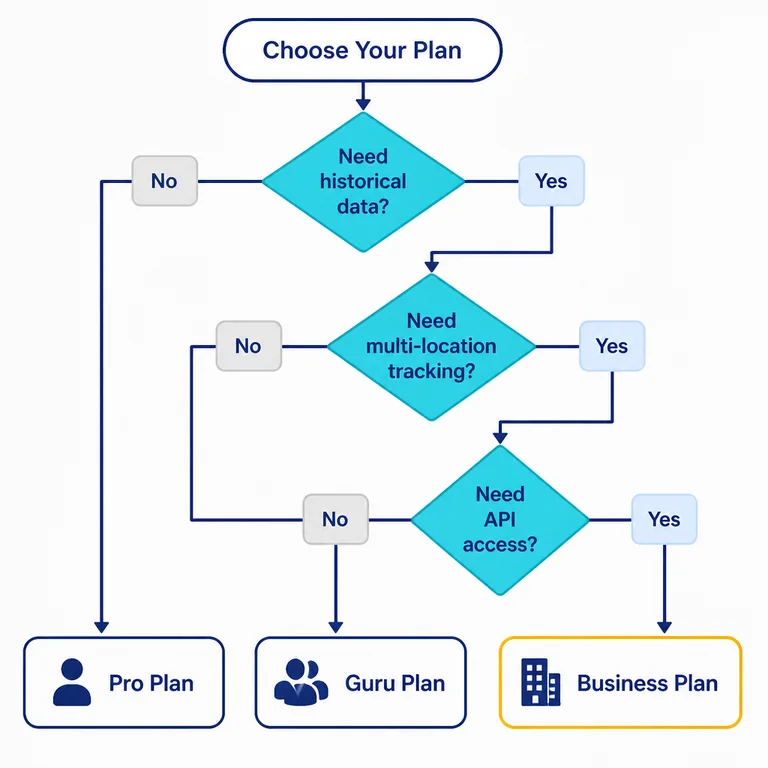
If your business serves customers in different physical locations or you’re comparing regional organic performance, you need it. Guru and Business support it; Pro does not. Even digital-only brands occasionally track regional differences for local SEO experiments, so if that’s on the roadmap, begin at Guru.
What happens when I outgrow Pro mid-subscription?
You can upgrade at any time. Semrush prorates the remaining period and applies the difference toward the higher tier. Historical data from Pro will carry forward, but you won’t retroactively gain the missing months of data before the upgrade — you’ll only see trends from the upgrade date onward.
How much does an extra user seat actually cost?
Semrush charges a per-seat fee that varies by plan. On Pro, an extra seat runs roughly 50% of the base plan; on Business, it’s closer to 20%. If you need two users, factor the seat cost into the comparison — it can tilt the decision from Pro to Guru when the combined Pro price approaches Guru’s base rate. On Guru, adding a seat can push the effective monthly cost toward $300.
Is the API worth it if I don’t have a developer?
Most likely not. The API matters if you’re piping data into Looker Studio, building a custom client dashboard, or automating reports. Without that use case, it becomes an unused line item. Many agencies operate productively on Guru with manual exports or third-party connectors.
Does the plan choice affect AI-visibility tracking?
The classic plans don’t include AI-visibility monitoring; that lives inside Semrush One, which is a separate bundle. If you’re buying a classic plan for traditional rank tracking, AI visibility won’t appear in your reports. Evaluate whether you need both before splitting spend across two subscriptions.
Review SiaSEO as the operating system for structured SEO content production.