AI Blog Generation From URL to Published Post, on Video
A walkthrough video shows how AI blog generation moves from site analysis to a scored, CMS-ready article.

AI blog generation needs a clear path from source material to an approved, published article. In How to Create High-Impact Blogs from Video Source, Blogiq_ai walks through selecting a video input, pasting a YouTube link and choosing a language. This companion follows that example, then adds the website context, topic selection, editorial QA and CMS checks a B2B content team should document before release.
Video: “How to Create High-Impact Blogs from Video Source 🔥”
What the video establishes about URL input
The narrated workflow in Blogiq_ai’s tutorial begins with a source URL. The creator signs in, opens the blogs area and selects the blog-generation option. Among the available input categories, the demonstration chooses video, then YouTube. The creator pastes a video link and keeps English as the article language.
Those actions establish the input sequence described in the excerpt. They do not establish the accuracy of a completed article, its search performance or its publication status.
The distinction matters because two different URLs can enter a content workflow. A website URL supplies business context. A video URL supplies material for a particular article. Identify which role each address has before assessing the generated output.
DomeScribe’s YouTube conversion guide addresses the same source-link task: converting a YouTube video into a blog post. That task is narrower than managing the full editorial journey through publication.
The available video excerpt has no verified chapter timestamps. The sections below therefore follow its narrated actions without inventing time markers. Website analysis, calendar decisions, scoring and CMS release are editorial extensions to the demonstrated input process.
The excerpt also supplies no measured review time or evidence of ranking results. Assess the interface steps separately from claims about production speed or search outcomes. Record what the demonstration establishes, then validate the remaining stages against an actual article.
Add website context before accepting the draft
The video’s source-link input leaves a separate editorial question open: what should the article understand about the website publishing it? Resolve that question before treating source material as an approved brief.
Approve the business description
For a site-aware workflow, review the business description alongside the source video. Specify the intended reader, the problem the article addresses and the relationship between that problem and the site’s services.
When evaluating SiaSEO’s site-aware drafting, treat website analysis as a proposed editorial input. Check whether its description matches the business’s current positioning and the audience for this particular post.
Separate statements that can appear in an article from statements that need confirmation. Product positioning may guide terminology. Pricing, integrations, performance claims and customer results need their own evidence.
Keep the approved context compact enough to review. A useful record contains the audience, article purpose, permitted product references, evidence requirements and publishing owner.
For an agency, attach that record to the correct client. Before approving the draft, confirm the company name, product terminology and permitted claims against that client’s brief.
Specify the Canadian market deliberately
The tutorial’s English-language choice establishes a language preference. An editorial brief should also specify the market.
For a Canadian audience, request Canadian English and identify any geography-dependent claims that require review. Currency, availability, customer examples and regional terminology belong in that check.
Language and geography should remain separate decisions. An English article aimed at Canadian buyers does not need a city in its headline unless the reader’s task requires local information.
For example, a hypothetical Canadian SaaS company could publish a nationally relevant implementation guide while reserving local details for its customer examples. The brief should make that distinction explicit.
Before drafting, approve the audience and market description in writing. Keep unresolved product or regional details out of the article until someone confirms them.
Choose the search task before filling the calendar
After importing the video, decide which reader question the resulting article should answer. The tutorial’s topic can supply material, but the editorial brief must explain why that material belongs on the publishing site.
Give the article one concrete purpose
Write a short statement that connects the reader, their question and the article’s practical outcome.
For this companion, the reader is a content operator assessing a URL-to-publication workflow. The outcome is a documented set of controls for accepting and releasing an AI-assisted article.
A different video might support a product tutorial, an implementation explanation or a technical announcement. Choose the format that fits its evidence and the reader’s task.
A brief built around long-tail keywords should preserve those specific constraints. If the query concerns CMS approval, devote space to draft status, review ownership and publication checks. A broad discussion of writing speed would leave that task unanswered.
Before selecting the headline, ask whether the source contains enough detail to fulfil its promise. Narrow the promise when the evidence is thin.
Give each calendar entry a distinct job
The supplied video excerpt does not demonstrate keyword research or calendar generation. Treat those as separate planning decisions.
For each proposed post, record its reader question, supporting source, intended format and relationship to existing pages. Review overlapping entries together.
Use the overlap review to choose among three practical actions: create a distinct article, update an existing page or reject the proposed topic. Document the reason before assigning a publication date.
Calendar approval should also identify the editor responsible for unresolved claims. A post with incomplete evidence needs a review assignment before it needs a release slot.
Keep the source URL attached to the calendar entry. The eventual reviewer should be able to trace the proposed article back to its original material without reconstructing that connection from the draft.
Turn the video into an article with traceable claims
Once the URL and language are selected, the editorial task is to build a written explanation that preserves the source’s meaning. Use the video’s demonstrated actions as the foundation, then mark where the article adds advice or context.
Separate demonstration from editorial guidance
Describe the creator’s actions with direct attribution. In this example, Blogiq_ai selects a video input, pastes a YouTube link and chooses English.
Editorial additions should use a different register: recommendations, decision criteria and proposed checks. The site-context and publishing guidance in this article belongs in that category.
Keep that boundary visible throughout the draft. A reader should be able to distinguish a control described in the tutorial from a control the article recommends introducing.
Preserve qualifiers when translating speech into prose. If a presenter describes a personal result, attribute it to that presenter. If the excerpt stops before an outcome, leave the outcome unconfirmed.
Build the article around the reader’s task rather than the transcript’s order. A repeated spoken explanation can become one paragraph. A brief mention of an approval setting may deserve a fuller explanation if release control is central to the article.
For every material claim, record its supporting source and whether it needs further confirmation. Remove any claim that the editor cannot trace.
Use screenshots to explain decisions
A screenshot should help the reader understand a specific choice. The video-input selector or language control would be relevant to this demonstration.
Use a captured frame only when it is available and accurately represents the interface being discussed. Do not reconstruct a product screen and present it as documentary evidence.
A useful caption identifies the decision shown in the image. Alt text should describe the visible content without adding performance claims.
If a screenshot contains settings that may have changed, identify the version or recording date when that information is known. Leave it unspecified when it is unavailable.
Review images alongside the prose. Confirm that the caption, alt text and surrounding explanation all describe the same action, and remove any image that adds no instructional detail.
Make semantic QA a documented release decision
The video excerpt does not document semantic scoring. For the full publishing workflow, define what editorial QA should assess and which findings must prevent release.
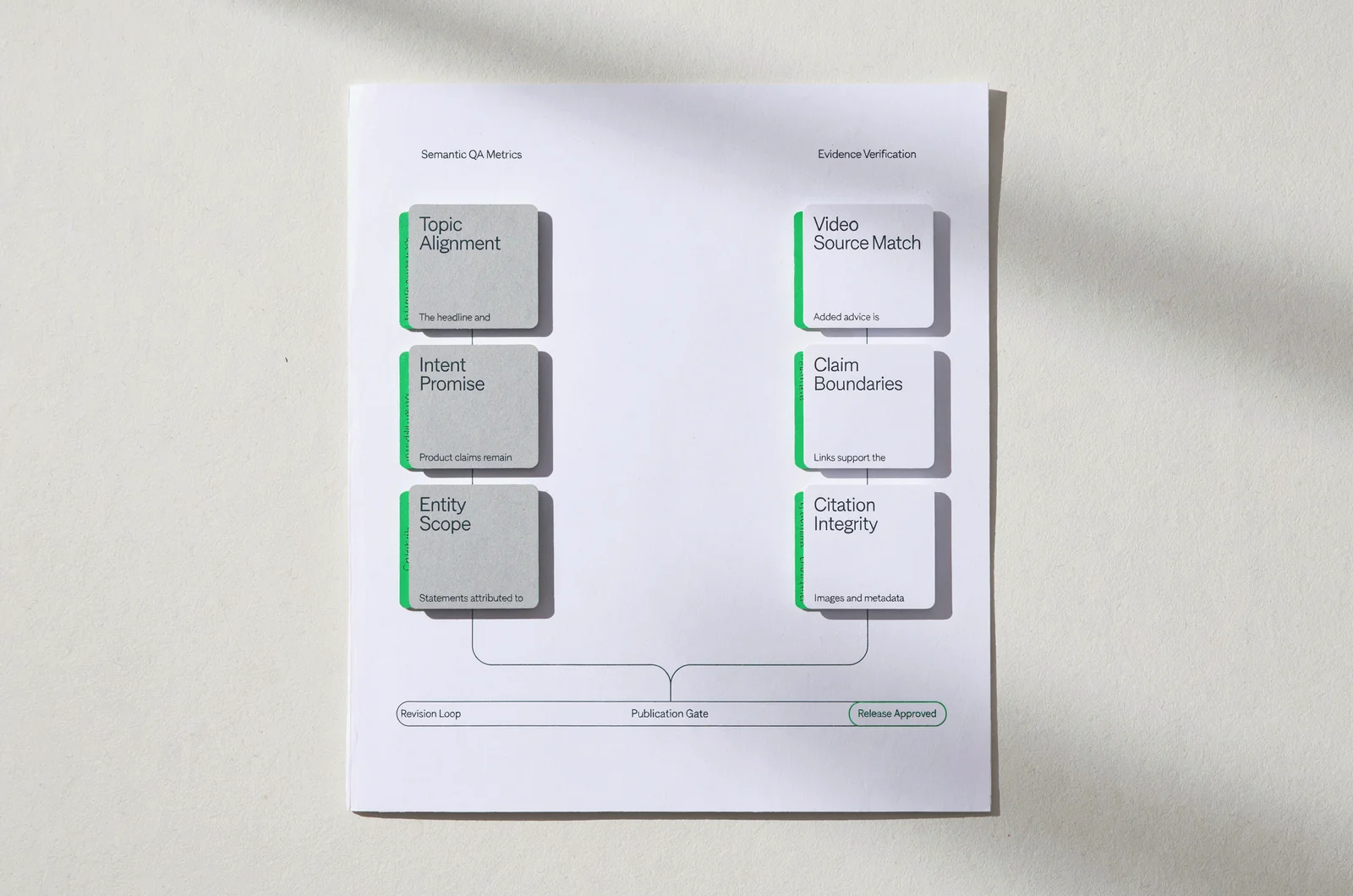
Separate the score from the evidence review
For SiaSEO’s semantic QA scoring, ask what each reported measure assesses and which decisions remain with an editor. Keep the measure’s scope attached to its result.
A review of topic alignment should answer whether the article addresses the approved reader question. An evidence review should answer whether its material claims have support. Treat those as separate tasks.
Avoid approving an article solely because its overall score looks favourable. Read the underlying findings and identify any unresolved errors.
A practical review should check whether:
- The headline and opening promise the outcome the article actually delivers.
- Product claims remain within the approved business context.
- Statements attributed to the video match its documented content.
- Added advice is distinguishable from demonstrated behaviour.
- Links support the claims beside them.
- Images and metadata describe the article accurately.
Use findings that an editor can act on. “The headline promises CMS publication, but the source only documents URL input” is a specific revision request.
Record the required change beside the finding. A reviewer should know which passage needs attention and what evidence would resolve the issue.
Assign release authority explicitly
Decide which findings require revision and who can approve the article after those revisions. Make that decision before enabling automated publication.
A useful interactive addition would be a release-readiness selector. It could ask whether claims are supported, source attribution is complete, client context is correct and the CMS preview has been approved.
Its output should identify the remaining review tasks and their owners. Any pass or hold rules would need approval from the editorial team before use.
Keep a short record of the final decision: the reviewed article version, outstanding findings, changes made and approving editor. Require another review when later edits materially change the article’s claims or promise.
Carry the approved article through the CMS
The transition from an accepted draft to a published page needs its own check. The video excerpt does not show that handoff, so the following controls are recommendations for the release process.
Confirm what the integration will create
With SiaSEO’s CMS publishing, verify the intended destination and publication behaviour for the connected site. Confirm those settings before sending an approved article.
Start with the destination website and the expected post status. An agency should check that both belong to the intended client.
Then review the fields that will reach the CMS:
- Title and slug.
- Body copy and heading levels.
- Meta title and description.
- Author, categories and tags.
- Images, captions and alt text.
- Embedded video.
- Draft, scheduled or published status.
Confirm which fields the integration transfers and which require a separate edit. Keep that mapping with the site’s publishing instructions.
Treat permission to publish as a separate decision from permission to generate a draft. Specify who may enable automatic release and which article categories remain subject to manual approval.
Before the first release, check the connected destination using an approved draft and inspect the resulting CMS record.
Inspect the rendered page
Review the page preview after transfer. Check that heading levels remain correct, links reach the intended destinations and the video player appears beneath the opening.
Inspect the title, metadata and URL alongside the body. The publication record should match the article version the editor approved.
Check image sizing, captions and alt text in the rendered page. Remove any leftover drafting notes or unsupported placeholders before release.
If the article is scheduled, confirm the date and time zone. If it is already published, confirm the public URL and verify that the page contains the approved content.
Record the release result as a completed action: the approved version, destination, final status and public address. Keep correction and unpublishing instructions accessible to the person responsible for the page.
After publication, review content correctness separately from search outcomes. First confirm that the intended article reached the intended page; evaluate traffic, engagement or visibility through the team’s reporting process.
Questions about moving from a video URL to a live post
The URL-import demonstration leaves several operational decisions for the publishing team. Settle them before making the workflow automatic.
Does a website URL replace the editorial brief?
Keep an approved brief. Website analysis can inform business context, while the brief defines the reader question, source requirements and limits for this article.
Review the analysis against that purpose before accepting it as drafting input.
Can this video validate the entire publishing workflow?
The available excerpt supports the narrated input sequence. It does not document site analysis, keyword selection, semantic scoring or CMS publication.
Assess those stages using a complete demonstration or an article whose progress through each stage can be reviewed.
What should happen when a claim lacks support?
Remove it, narrow it to what the evidence establishes or hold the article until the appropriate reviewer confirms it.
Do not turn a presenter’s assertion into an unattributed fact simply because it appears in generated copy.
When should automated publication be enabled?
Enable it after the team approves the release rules, destination mapping and correction process. Assign someone to handle exceptions.
For the first end-to-end assessment, retain an article’s source URL, approved brief, QA findings and published page record. Use that record to identify the exact stage where a correction is needed.