Automate Blog Posts in Webflow vs WordPress Step by Step
Learn how to build an automated blog post pipeline across Webflow and WordPress using webhooks, custom fields, and scheduled publishing rules.
For technical marketers comparing Webflow vs WordPress automated publishing pipelines, the practical task is to move an approved article into the correct CMS, publish it on schedule, and verify the public page. Build that workflow around a shared article record and separate destination adapters. This walkthrough covers webhook intake, field mapping, approval triggers, release checks and recovery. The examples describe a proposed implementation; match authentication, field identifiers and publication actions to your site configuration before enabling live writes.
1. Define the release boundary and success checks
Give the Webflow and WordPress workflows the same acceptance criteria before configuring either destination. A completed run should produce one intended public article and a traceable record of its release.
Prepare a test destination, credentials with the required permissions, a representative article, and access to the rendered page. Identify the editor who approves publication and the operator who handles failed jobs. Keep live publication disabled during setup.
Record the destination site, content type or collection, language, author, category and publication timezone. For an English-language site serving Germany, distinguish the article’s language from its market. Store both when your workflow needs them.
Define these checks before building the connector:
- An unapproved revision remains unpublished.
- Replaying the same event creates no duplicate article.
- A scheduled article stays unpublished before its release time.
- A successful release produces the expected public URL and content.
- A failed write leaves enough information to resume safely.
Use an article with headings, an image, internal links and metadata. A plain-text sample will leave important mapping paths untested.
Keep topic selection upstream of the publishing queue. If that process still needs work, establish your small-team keyword research process before connecting automated releases.
Verify the starting state by recording the test article’s identity and confirming that it has no public page.
2. Build one article payload for both CMSs
Define a shared input record so both CMS adapters receive the same editorial decision. Keep destination-specific transformations inside each adapter.
Use a stable source identifier, a revision number and an explicit destination. Include the approved content, publication time and review state. If SiaSEO supplies the draft, attach the selected text and quality decision to that same revision.
The following hypothetical event is an internal format, not a native request body for either platform:
{ "source_id": "article-042", "source_revision": 3, "destination": "webflow", "site": "de-main", "locale": "en-DE", "title": "Content approval rules", "slug": "content-approval-rules", "body_html": "
Approve each revision
Record the reviewer before publication.
", "summary": "A workflow for reviewing article revisions.", "hero_asset_ref": "asset-017", "publish_at": "2026-11-12T08:00:00Z", "approval": { "state": "pending", "revision": 3 } }Treat locale as an internal label. Translate it into the language or locale identifier configured at the destination.
Separate editorial values from destination identifiers
Store CMS item IDs, media IDs and taxonomy IDs in the adapter’s mapping record. Keep them outside the editorial payload so changing destinations does not require rewriting the article.
Define two internal operations: save_draft(article) and publish(cms_id, revision). These are proposed adapter interfaces. Implement their underlying requests through the connection available for each site.
Validate required values before accepting a job. Reject missing titles, unknown destinations, invalid timestamps and approval records attached to a different revision.
A useful interactive tool would be a payload checker that highlights missing mappings and mismatched approval revisions before submission.
Verify this step by passing one complete event and one deliberately invalid event through validation. Only the complete event should enter the queue.
3. Connect the Webflow collection and draft route
Configure the Webflow adapter against the collection intended for blog articles. Make the first operation save an unpublished item, then record its returned identifier.
Map content to the selected collection
Inspect the selected collection’s field identifiers and required values. Write an explicit mapping for the article title, slug, body, summary, image and any SEO fields your site uses.
Map each value by its actual destination identifier. Give the mapping a version so operators can identify which configuration produced a failed write.
Resolve authors, categories and other references before saving the article. If an expected reference is absent, stop the job with a specific error rather than silently dropping the relationship.
Keep the example’s hero_asset_ref internal. Resolve it through the asset process configured for your site, then pass the resulting value into the image field.
Save and inspect an unpublished item
Run save_draft(article) with publication disabled. Store the returned item ID alongside the source ID, revision, destination and mapping version.
Retrieve the saved item and compare its values with the input. Inspect the rendered preview too. Check heading hierarchy, lists, links, image placement and any body formatting your publication uses.
Route later updates through the stored item ID. A slug change should update the intended article without starting another create operation.
The expected result is one unpublished item with the intended fields populated. Verify that repeating the same source event resolves to that item, then confirm that the article remains absent from the public site.
4. Connect the WordPress post and media route
Configure the WordPress adapter to accept the same internal record while using the post type and writable fields configured on that site.
Create the draft and resolve references
Select the destination post type. Configure the initial write to save an unpublished draft with the title, slug, body and excerpt mapped from the shared payload.
Resolve the author, categories and tags against the destination’s identifiers. Define what should happen when a requested value is missing. For this lab, stop and request a mapping correction instead of creating new taxonomy terms automatically.
Store the returned post ID immediately after the successful write. Use that ID for subsequent edits to the same destination article.
Send SEO metadata only to fields that your connection exposes for writing. Keep unsupported values visible in the job record so an operator can address them.
Attach media and inspect the rendered page
Resolve the image asset through the site’s configured media process. Record the destination media identifier, then map it to the intended post field.
Treat image description, caption and placement as separate values where the site configuration supports them. Inspect the output rather than assuming that saving the asset completes every image requirement.
Retrieve the saved draft and compare its title, body and references with the source revision. Inspect the preview for duplicated headings, malformed links, missing images and unintended formatting.
The expected result is one draft associated with the correct source revision and media record. Verify that a second delivery updates the stored post ID and leaves the number of destination articles unchanged.
5. Add approval and scheduling triggers
Place a shared release gate in front of both publishing adapters. Require the approved revision, release time and destination mapping to agree before either adapter can publish.
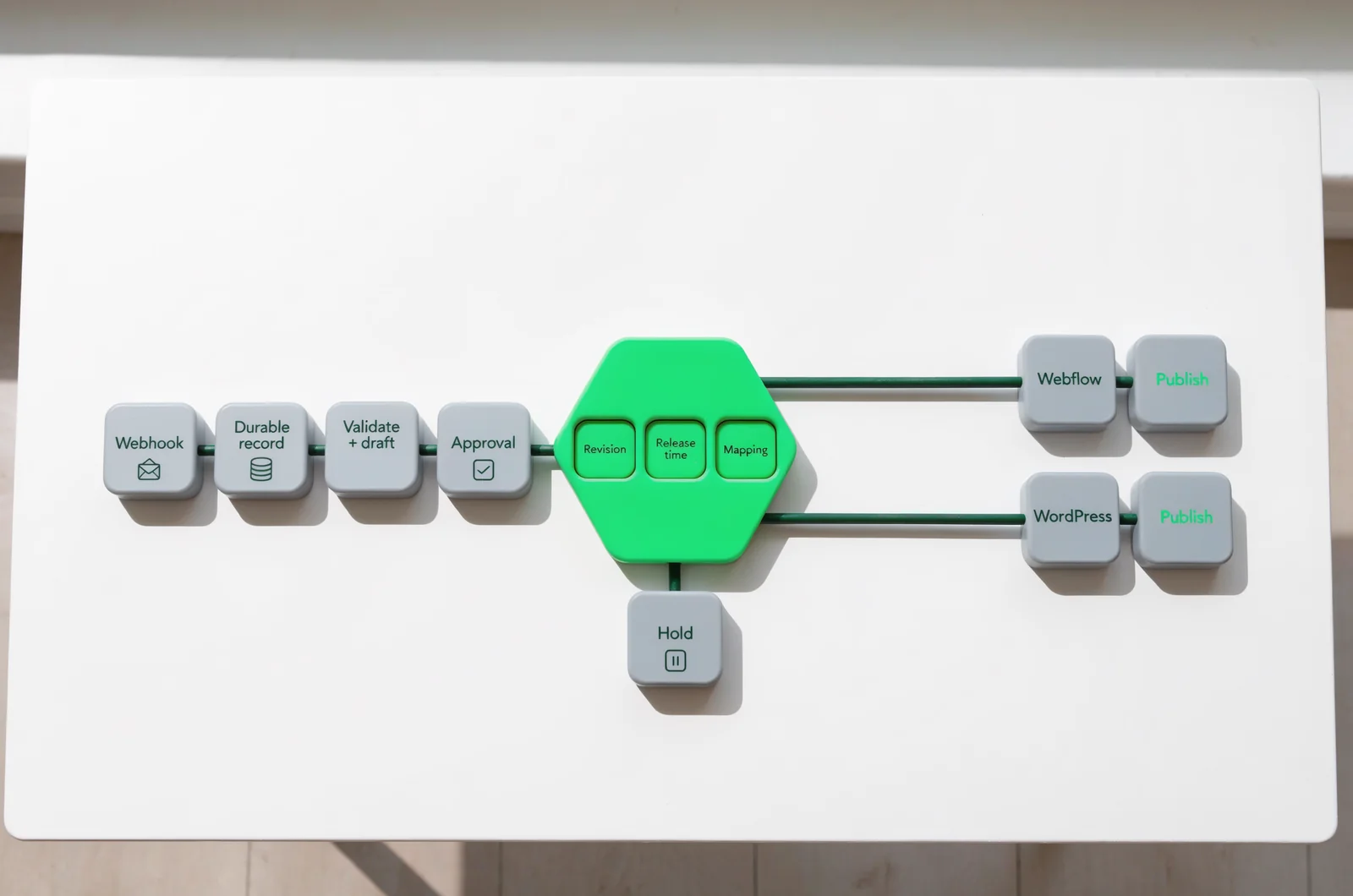
Enabling the publication action can make content public. Keep it disabled until both draft routes pass their checks.
Define separate events for saving a draft and requesting a release. A webhook carrying new content should enter validation and draft storage; approval should create or authorise the release job.
Before acknowledging an incoming webhook, durably record it. Validate the sender through the authentication mechanism configured for that integration. Keep credentials outside the article payload and logs.
Use explicit release conditions:
approval.state == "approved"
approval.revision == source_revision
current_time >= publish_at
destination_mapping_is_complete
release_is_not_already_confirmed
When SiaSEO provides quality scoring, retain that result with the revision. Apply your editorial threshold before approving the release.
Choose one scheduler to own publication timing. If the workflow runner owns it, retain unpublished CMS drafts until the release job becomes eligible. If destination scheduling owns it, record and verify that scheduled state.
Store a timezone-aware timestamp and show reviewers the intended local release time. Recheck approval immediately before the publication request.
Verify the gate with an approved future article, an unapproved due article and an approved due article. Only the third should reach the publication operation.
6. Make retries and updates safe
Give both CMS adapters a recovery path that distinguishes a confirmed failure from an uncertain result.
Build an operation identity from the destination site, source ID, revision and action. Persist it before making a remote write. Use durable uniqueness enforcement to prevent concurrent workers from starting the same operation.
Record the intended action, attempt time, CMS identifier, response outcome and last confirmed state. Keep operational diagnostics separate from credentials and article content that operators do not need.
Reconcile uncertain writes before repeating them
A timed-out request leaves the remote outcome uncertain. Mark the operation accordingly and inspect the destination before submitting another create request.
Use the stored CMS ID when available. If the connection permits a stable source marker, use it to reconcile a create operation whose response was lost. Where reconciliation remains ambiguous, send the job for manual review.
Configure bounded retries for failures you classify as temporary. Route invalid fields and missing permissions to an operator with the destination and mapping version attached.
Protect edits made after approval
Compare the revision at release time with the revision approved by the editor. Any content change should require a new approval under this workflow.
Define ownership for manual CMS edits. Either pause automated updates after a detected change or require a fresh comparison and approval.
Verify recovery by interrupting a test request after submission, then replaying its event. Confirm one destination article and one confirmed release record.
7. Prove the workflow before unattended release
Test the Webflow and WordPress routes with the same scenarios so their results can be assessed against one release standard.
Run the normal sequence first: accept the event, save a draft, approve its revision, reach the release time, publish and inspect the public page.
Then exercise the failure paths:
- Deliver the same event twice.
- Remove a required destination field.
- Change the article after approval.
- Simulate a timeout around a remote write.
- Supply an unresolved image reference.
- Make the configured credentials unavailable.
For every scenario, record the expected state, actual state and recovery action. A failed job should identify the article, destination and failed operation clearly enough for an operator to act.
After publication, retrieve the public URL without an authenticated editor session. Compare the rendered title, article body and intended metadata with the approved revision. Inspect images, internal links and any language-specific elements your template uses.
If your content programme includes AI search visibility, keep that assessment separate from the release result. Mark the publishing job complete only after the page checks pass.
Run one controlled live article through each enabled destination before expanding the queue. Preserve the resulting CMS IDs and release records as reference examples.
Publishing questions about edits and locales
Keep the same revision and destination controls when handling exceptions in either CMS route.
What should happen when a published article changes?
Save a new source revision and identify the fields it changes. Require approval for that revision before updating the stored CMS item. Verify the rendered page after the update, including fields that were meant to stay unchanged.
How should multilingual releases be grouped?
Track each language destination separately, with its own CMS ID, approved revision and release result. Add a shared article-family identifier if you need coordinated releases. Define whether one failed language version should pause the remaining jobs before enabling that policy.
What should happen if publication succeeds but verification fails?
Record publication and verification as separate outcomes. Keep the confirmed CMS ID and public URL, then route the failed page check for investigation. Resume verification from that record rather than creating another article.
When should an operator pause the queue?
Pause the affected destination when its mapping, credentials or publication behaviour becomes uncertain. Preserve pending jobs and their approval records. Resume with a controlled test article, then release the waiting jobs through the same approval gate.