Search Engine Optimization Steps to Fix Stalled Organic Pages
Learn practical search engine optimization steps to audit decaying content, resolve indexing issues, and recover organic visibility across stalled URLs.
Search engine optimization for a stalled page starts with a diagnosis. For marketing leads and content teams, the task is to identify where visibility has stopped progressing, make a bounded correction and check whether the intended queries respond. This walkthrough takes you from an unexplained plateau to a documented repair and measurement plan.
Gather page-level search performance, indexing inspection records, a crawler export and access to the published page. Arrange development support if the investigation reaches redirects, rendering or shared templates. Save the current content and configuration before editing.
Work on a small group of pages with comparable purposes. Keep country, device and search-type filters consistent. For English content aimed at Spain, record the audience country and page language separately.
Define release success before starting: the intended URL is accessible, its indexing configuration matches your decision, its content completes a clear reader task and its changes are recorded. Ranking recovery remains a separate outcome to measure. Establish who can approve the correction and who will review the evidence after publication.
1. Isolate the stall within a stable query group
Start by determining what has stalled for the page. Separate a ranking plateau from falling clicks, reduced impressions or weaker business outcomes.
Export performance for the affected URL across complete comparison periods with matching weekdays. Include an earlier baseline when seasonality or a previous release could explain the pattern. Preserve the original export so later reviews use the same starting point.
Group queries around the task they express. Keep branded searches separate from discovery queries, and distinguish informational questions from searches for a product or service.
Read the metrics together:
- If clicks fall while impressions and position remain broadly stable, investigate click-through behaviour and the visible search result.
- If impressions fall across relevant queries, examine demand, visibility and indexing evidence before rewriting.
- If position changes mainly because the query mix has changed, inspect the original query group separately.
- If visits remain stable while enquiries fall, review the page’s conversion path alongside its organic performance.
Treat these patterns as investigation routes. Each needs supporting evidence.
Use the same data source and export settings throughout. Record missing query data as unavailable rather than treating it as proof of absent demand. If keyword tools inform the diagnosis, include keyword database freshness in the review.
Finish with a specific problem statement: identify the URL, affected query group, market, device segment, comparison periods and metric that stopped improving.
2. Reconcile the requested, rendered and indexed page
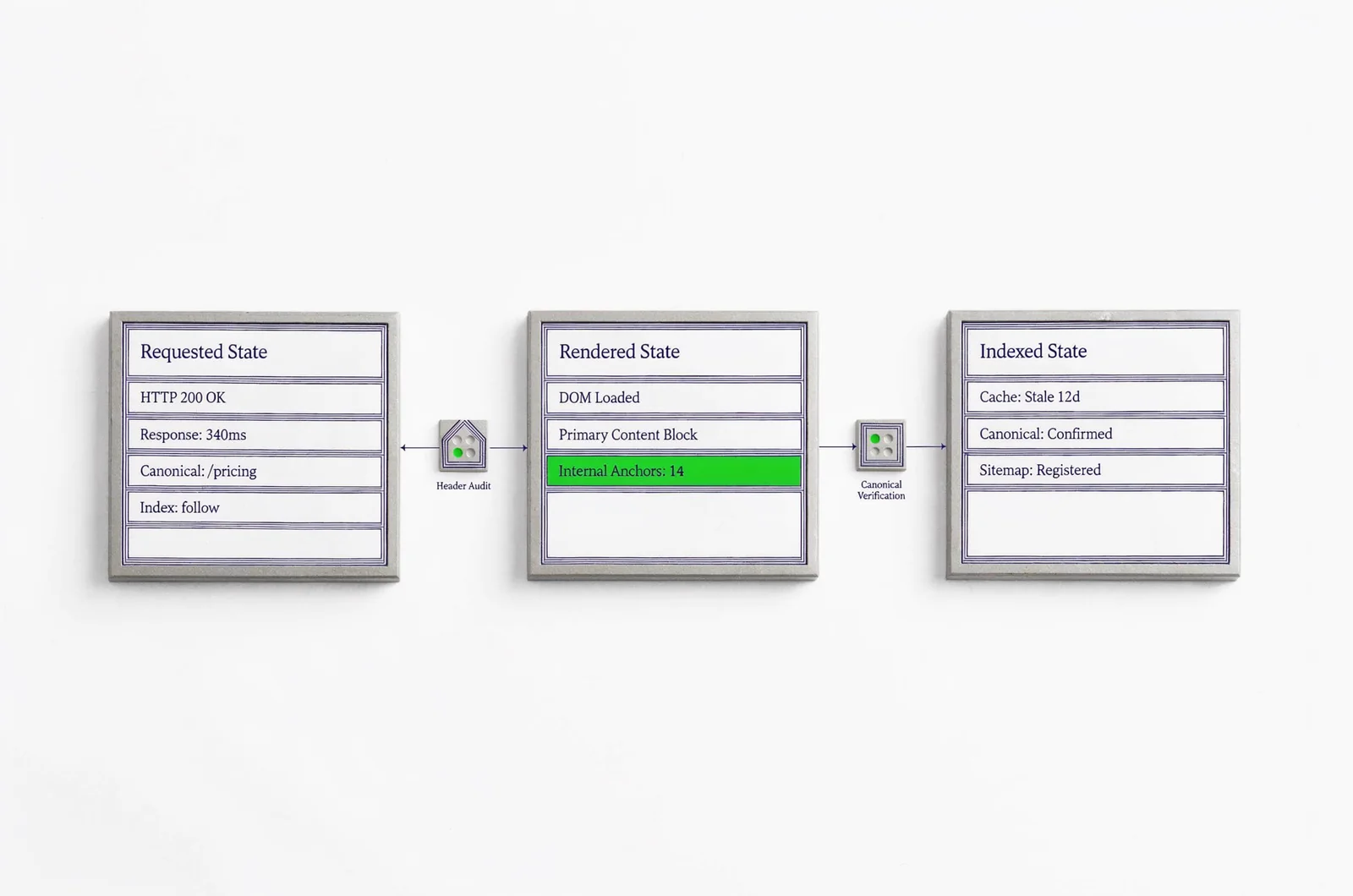
A content repair needs a confirmed technical target. Compare what a visitor requests, what the page renders and what the search engine’s inspection record reports.
Trace the URL and its indexing configuration
Request the exact URL from the performance report. Record its response, redirect destination, declared canonical, indexing directives and sitemap entry. Compare those records with the selected canonical and indexing status where inspection data is available.
Before changing redirects, canonical declarations or indexing rules, save their current values and prepare a rollback. Check whether a proposed change affects a single page or a shared template.
Write the expected state beside the observed state. For example, specify which URL should remain accessible and which canonical should represent it. Flag every disagreement for investigation instead of treating the presence of a canonical tag as sufficient verification.
Check robots access separately from indexing directives. Keep both findings in the repair record.
Compare the rendered content with the intended page
Inspect the main content in the delivered HTML and rendered page. Check the title, H1, central answer, navigation and contextual links.
Repeat the inspection without an authenticated session. If consent choices, scripts or personalisation change the content, record which version each inspection captured. A screenshot alone leaves the underlying delivery unclear.
Distinguish live observations from historical inspection records. Label capture dates so an older result does not appear to describe the current release.
Complete this step with a discrepancy list. Each item should contain the affected URL, expected behaviour, observed behaviour, supporting record and owner responsible for resolving it.
3. Assign one reader task to the page
Once the intended URL is confirmed, decide whether its content answers the task behind the affected queries. Write that task as a sentence before changing the outline.
Match the outline to the searcher’s decision
Review representative queries and their current results in the intended market. Note the formats, practical questions and level of detail visible there. Use those observations to challenge the page’s assumptions.
Write a task statement such as: “Help an operations lead preserve CRM field mappings during migration.” Then inspect whether the opening and section order support that task.
Suppose a migration guide receives queries about preserving field mappings but opens with several paragraphs about migration benefits. Move a mapping example, validation procedure and exception handling ahead of that background.
Keep adjacent queries when they contribute to the same task. Use long-tail keyword targeting limits to review scope, then remove sections that require the reader to pursue a different objective.
Resolve overlap before proposing consolidation
List other owned URLs that address the same task. Compare their audience, purpose, query coverage and useful content before deciding whether they compete.
Avoid merging pages solely because they share keywords. Check whether each page has a distinct job that deserves its own destination.
Before any consolidation, preserve unique material, map the destination and identify internal links that need updating. Confirm the redirect and rollback plan before removing an existing URL.
Leave this step with an approved task statement, a revised outline and a documented decision about overlapping pages.
4. Replace the blocks that obstruct task completion
Revise the stalled page against its approved task. Mark each existing section for retention, correction, replacement, relocation or removal, and explain the decision in the editing brief.
Put the missing answer where readers need it
Move the central answer or procedure near the start. Retain background where it explains a constraint, supports a decision or prevents an execution error.
For a procedural page, inspect every instruction for an action, reason, expected result and verification cue. Replace vague directions such as “optimise your settings” with the setting to inspect, the intended state and the check that confirms it.
In the migration example, show how to compare source fields with destination fields. State which records require manual review and how the reader should verify the mapping before proceeding.
Add screenshots, worked examples or decision branches only where they resolve uncertainty. Ask a reviewer to identify what the reader should do after each section. Rewrite any passage that leaves that answer unclear.
Check generated revisions against approved evidence
If SiaSEO is part of the drafting workflow, supply the page purpose, approved query group, retained evidence and boundaries for the revision.
Review generated passages against the original material. Check named entities, product limits, instructions and assertions that require a source. Remove unsupported claims rather than filling gaps with plausible wording.
Keep editorial review and factual verification as separate decisions. A well-structured draft still needs its changed claims checked.
Compare the revision with the saved version before approval. Require an explanation for every removed example, altered instruction and new factual claim. End with a change record that identifies exactly which content blocks changed and why.
5. Repair discovery and language mismatches
Check how readers and crawlers reach the revised page. Inspect the actual links on relevant published pages, including their anchors and final destinations.
Start with maintained category pages, closely related articles and navigation paths where the destination answers a useful follow-up question. Add contextual links where the relationship is clear. Avoid inserting the page into unrelated articles to increase the link count.
Follow each link through to its destination. Confirm that it reaches the intended URL without an unexpected redirect, authentication requirement or error. Inspect the rendered link rather than relying on a CMS editing field.
For international content, inventory the intended language and country audience for each version. Keep those fields separate during the audit.
Check each intended language variant’s response, canonical declaration and any reciprocal hreflang entries. Compare the visible content with its declared language. Investigate generic template values or regional redirects that conflict with the approved configuration.
Review internal anchors across language versions, too. Choose wording that describes the destination’s task in the surrounding page’s language.
Finish with a discovery record: list the referring pages, changed anchors, destination URLs and language relationships that were checked. Assign any shared-template corrections separately from edits to the individual article.
6. Validate and release a bounded correction
Prepare the stalled page’s repair as a reviewable release. Record the diagnosis, changed elements, expected observations and conditions that would trigger rollback.
Separate unrelated work where practical. If the release combines content, canonicals, navigation and redirects, document each component so the later review can identify what changed.
Check the revision on staging or preview, then repeat the checks on the published URL:
- Confirm that the intended page is accessible and renders its main content.
- Compare the live title, canonical and indexing directives with the approved values.
- Follow changed internal links and test any affected forms or conversion paths.
- Inspect the page on mobile and desktop.
- Confirm that preview restrictions or staging directives were not carried into publication.
For teams publishing through SiaSEO, keep the approval record attached to the revision and verify the resulting CMS page after publication. Record the live URL and revision identifier in the release log.
A useful interactive release checklist could accept the intended URL, observed canonical, indexing status and approval state, then flag unresolved discrepancies for review.
Before closing the release, capture the published page and its technical inspection records. Save the release date, responsible owner and previous version alongside them. Schedule the measurement review using the comparison method established at the start.
7. Measure the repair against its original diagnosis
Return to the original query group when reviewing the stalled page. Keep the country, device, search type and comparison method consistent with the baseline.
Check available crawl evidence to establish whether the revised page has been revisited. Record unknown status explicitly. Distinguish the publication date from any later crawl or inspection date.
Choose the review window to suit the page’s traffic and reporting volume. Avoid declaring success from an isolated query movement or a brief change in clicks.
Assess the result against the original problem:
- For an indexing discrepancy, inspect the URL’s current state and selected canonical.
- For an intent mismatch, compare performance across the intended query group and review whether the page completes the reader task.
- For a weak search snippet, inspect the visible result and evaluate click-through changes within comparable query and position conditions.
- For a conversion problem, review the affected business action using the same measurement definition as the baseline.
Record concurrent changes, including campaigns, migrations and other edits to the page. Treat an uncontrolled before-and-after comparison as directional evidence.
If the expected change does not appear, reopen the relevant diagnosis. Check the delivery and observation records before adding another rewrite to the queue.
Close the review with one recorded decision: retain the revision, revert a specific change or investigate a named unresolved cause. Attach the evidence and name the person responsible for the next review.
Decisions while recovery remains uncertain
Use the repair record to answer questions about further changes. Keep each decision tied to what has been verified.
Should every stalled page receive a rewrite?
Reserve rewriting for a documented content problem. If the intended URL is inaccessible or its indexing configuration conflicts with the plan, resolve that discrepancy first. If the page already completes the reader task, investigate demand, search presentation, discovery and measurement before replacing its content. Record the evidence that would justify reopening editorial work.
How long should you wait before editing again?
Choose the review window before release, based on reporting volume and available crawl evidence. Separate publication, revisit and performance observation dates in the record. Fix verified release defects promptly. For an unclear performance result, preserve the current version while gathering enough comparable observations to support another decision.
Should you publish a replacement URL?
Write down why the existing URL cannot support the intended task before proposing a replacement. Review its useful content, inbound paths and measurement history. If replacement remains justified, approve the destination mapping, redirect behaviour, internal-link updates and rollback plan before publication. Verify the old and new URLs together after release.