Should Agencies Pick Webflow or WordPress for Automated Publishing?
Webflow vs WordPress automated publishing, answered: API access, CMS limits, plugins, scheduling, and which fits multi-client agency pipelines.

For agencies comparing Webflow vs WordPress automated publishing pipelines, the decision should follow the publishing responsibilities your team can support. Put WordPress first when client-specific extensions are a requirement and someone accepts maintenance ownership. Put Webflow first when the editorial workflow fits an agreed collection model. Make either recommendation conditional on a demonstration of the client’s required workflow. The questions below separate API access, approval states, scheduling, dependencies and capacity so an agency can choose a destination without surrendering editorial control.
Which CMS fits the agency’s publishing responsibilities?
WordPress should lead your shortlist when extensibility is a requirement you can maintain; Webflow should lead when the required publishing workflow fits a defined collection structure.
Treat these as conditional recommendations. A client’s actual configuration, permissions and integration support must decide the purchase. Confirm current product behaviour and account entitlements before committing to either platform.
Start with the exceptions your agency must accommodate. Does one client need a different approval chain? Must another publish several article formats? Who resolves a failed update after the account manager has finished work?
Write those requirements before discussing platform preference. An agency with technical ownership can consider a different operating model from one contracted only to deliver approved articles.
For an established client, make retaining the current CMS the starting assumption. Require a specific unmet requirement to justify migration. A different interface alone is a weak reason to introduce content mapping, redirects and staff training into the project.
Assign an owner to each responsibility:
- The client approves the content model and publication permissions.
- The agency owns the agreed editorial checks and escalation process.
- A named technical owner maintains the connection and its dependencies.
Record these responsibilities in the scope of work before selecting a publishing integration.
Which API capabilities should decide between Webflow and WordPress?
Choose the integration that demonstrates the required publishing actions in the client’s environment, rather than ranking Webflow and WordPress by API reputation.
Judge API maturity through the operations your agency needs. Require evidence that the proposed connection can authenticate, create content, update an existing item, handle media and expose useful failure information. Confirm the permissions required for each action.
Separate basic access from editorial completeness. A successful text upload leaves several questions unanswered: where did the description go, which author was assigned, and did the article reach the intended destination?
Ask for a representative article with a heading hierarchy, internal links, an image, metadata and the required taxonomy. Compare the submitted fields with the saved record and rendered page. Use the article publishing workflow as context for defining the handoff, then specify your destination’s acceptance criteria.
Also test an ambiguous response. Suppose the CMS accepts a request, but the connection ends before confirmation reaches the publishing service. Require a documented method to establish whether the item exists before another creation attempt.
For either CMS, request a capability record that names the supported action, necessary permission, confirmation method and responsible owner. Treat an undocumented action as unresolved during procurement.
How should drafts, approvals and live updates be controlled?
Require both Webflow and WordPress workflows to distinguish saved content, editorial approval and verified publication.
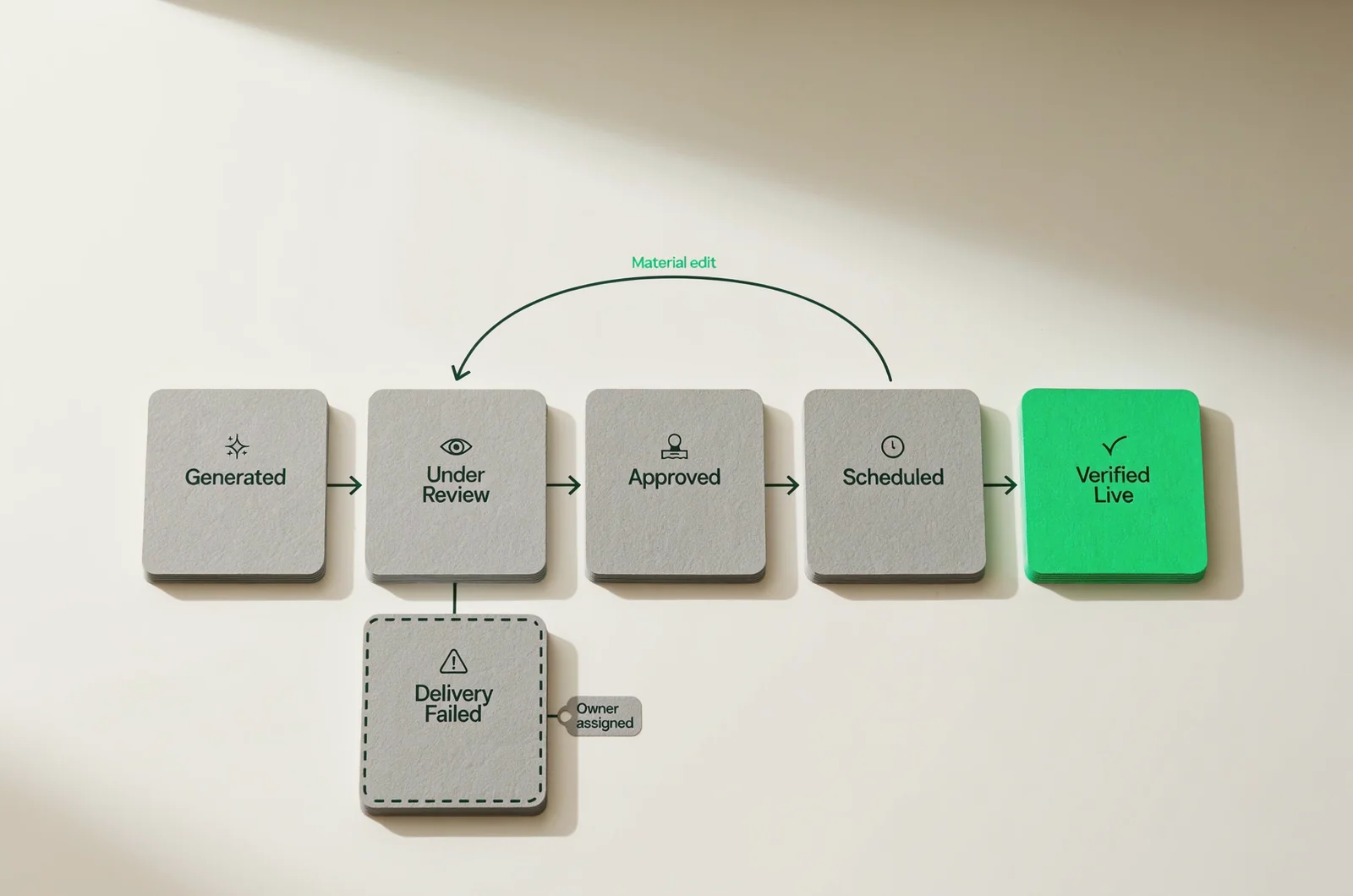
Define those states in the agency’s own process before mapping them to the destination. An editorial approval is a decision by an authorized person. A CMS status is a stored value. Your acceptance test should demonstrate how the two connect.
A practical state model can distinguish generated, under review, approved, scheduled and verified live. Give failed or uncertain deliveries their own visible status. Avoid treating an accepted request as sufficient evidence that the intended article is public.
When SiaSEO supplies a draft and semantic QA score, retain the approved content version alongside that score. Require renewed approval after a material edit to the approved version. Keep model selection, discussed in content model benchmarks, separate from permission to publish.
Live updates deserve their own policy. Decide whether an approved revision may replace published content immediately or must wait for another release window. Specify who can authorize changes to a headline, slug or destination URL.
Ask the implementation owner to demonstrate an edit to a published article while preserving the existing public version until approval. If that workflow is unavailable in the proposed configuration, document the alternate review process before granting automated update permissions.
Who should own scheduling and missed publication times?
Assign one scheduling authority for each Webflow or WordPress destination, with a named owner for missed releases.
Either the CMS or an external publishing service can be the proposed authority, subject to demonstrated support. Avoid assigning overlapping responsibility without an explicit coordination rule.
For a Victoria client, record the intended publication time with a named time zone. Retain a normalized execution timestamp as well. Ask what happens when someone edits the scheduled time after approval, and test clock changes wherever the selected zone observes them.
The more consequential question is how the workflow handles a missed slot. Define whether it should publish late, wait for the next window or request a decision. Make that policy specific to the content. A delayed evergreen article and an expired campaign announcement should not share an automatic recovery rule.
Also distinguish a failed release from an uncertain result. If a publication request times out, require a destination check before a retry.
Use a hypothetical Friday release to expose the operational gap: if confirmation is still missing after the team finishes work, who receives the alert, and what can they authorize?
Write the recovery policy into the client agreement. Include the escalation owner, acceptable delay and conditions that require fresh approval.
How much should plugin dependencies influence the choice?
Let dependencies influence the decision according to their maintenance burden and role in the workflow, rather than their count alone.
For a proposed WordPress implementation, request an inventory of every plugin involved in authentication, metadata, scheduling, permissions and publishing. Mark each as required or optional. Assign an owner for updates and compatibility checks.
For a proposed Webflow implementation, apply the same scrutiny to middleware, connectors, custom code and field transformations. Include every component between the approved article and its final destination in the review.
Ask a concrete question about each dependency: what stops working if this component changes or becomes unavailable? Require an answer tied to a publishing action.
A dependency that transforms metadata needs a different recovery plan from one that controls publication permission. Review them separately instead of accepting a single assurance that the integration is supported.
The exception is a client with an established, maintained stack. Replacing a working component requires a documented benefit and a migration plan.
Before approval, name the person who will investigate a broken field mapping or rejected request. Put that responsibility beside the component in the inventory, with a route for escalation when the primary owner is unavailable.
How should collection limits and publishing volume affect the decision?
Compare Webflow and WordPress against the client’s projected content inventory and publication workload, using verified limits for the proposed configuration.
Avoid relying on a platform-wide headline number. Request the applicable account, hosting, API and content-storage constraints, then record which limits are enforced and how usage is measured.
Suppose a client plans 40 new articles a month. That is 480 additions over a year, before any other content records enter the forecast. Use this hypothetical calculation to request enough capacity for the actual model, rather than buying against today’s article count.
Ask how the proposed implementation counts drafts, localized versions, authors, categories and other supporting records. Use the documented counting rules in the forecast.
Then examine release concentration. A monthly total does not describe whether articles arrive throughout the week or in one approved batch. Request a capacity assessment for the expected batch, including media and update operations.
Keep editorial structure in this discussion. Different search intent templates may require different fields, review rules or layouts. Decide which differences belong in the content model before estimating capacity.
Require a plan for approaching a limit. Name the owner who receives the warning, the expansion or cleanup option, and the work that must pause if capacity cannot be increased.
What must stay separate across agency clients?
Keep credentials, destinations, field mappings, approval rules and delivery records separate for every Webflow or WordPress client.
Require a shared agency interface to preserve those boundaries throughout the workflow. Make the destination visible while an article is reviewed, approved and released.
Before automatic publishing, ask for a demonstration that an article approved for one client cannot be delivered through another client’s connection. Include similar site names in the acceptance exercise so the team must verify the destination itself.
Require the publishing record to identify:
- The client and intended website.
- The approved article version and destination record.
- The permission used for delivery.
- The scheduled time and confirmed result.
Define the boundary for shared changes too. A connector update intended for one client should pass that client’s checks before wider adoption. Specify which clients share a release and which require separate validation.
Offboarding belongs in the original scope. Require a process to revoke access, stop queued publications, export delivery records and transfer unresolved work.
For agencies managing mixed CMS portfolios, standardize the editorial contract across clients. Preserve destination-specific mappings beneath it. Require every handoff to include an article identifier, version, approval decision and intended action, regardless of the receiving CMS.
How should agencies compare operating costs and migration risk?
Compare Webflow and WordPress through the cost of operating the approved workflow, including maintenance and recovery work.
Request a scoped estimate for setup, content mapping, permissions, ongoing support, failed deliveries and client-requested changes. Separate recurring subscriptions from labour so the agency can see who absorbs each expense.
Use the same article and approval scenario for both estimates. Otherwise, one proposal may price a text upload while the other includes metadata, media handling, editorial review and confirmation.
For a workflow built around SiaSEO, assess drafting and quality scoring separately from destination delivery. Confirm the exact CMS connection and supported actions before including them in the scope. Require each supplier to state where its responsibility ends.
An interactive selector could help here: enter required fields, approval stages, monthly output, client count and available maintenance hours, then flag unmet requirements before comparing estimated costs.
Migration needs its own budget. Include URL mapping, metadata checks, media transfer, author attribution, redirects and approval by the client’s team. Ask who verifies the transferred content before the old workflow is retired.
If both destinations satisfy the requirements, favour the option with a clearly assigned operating burden. Require any projected migration benefit to name the publishing problem it resolves and the person accountable for delivering it.
What should a CMS prove before an agency enables automatic publishing?
Require the chosen Webflow or WordPress implementation to complete a representative release, an update and a controlled failure before granting automatic publication authority.
Use an article that resembles the client’s normal work. Include its actual field requirements and approval route. Avoid choosing a sample that bypasses the difficult parts of the scope.
Set acceptance criteria before the demonstration:
- The article reaches the correct client and destination.
- Required fields survive the transfer and render as approved.
- Unapproved content remains outside the public release.
- A scheduled release follows the agreed time policy.
- An uncertain response triggers reconciliation before another creation attempt.
- A rejected article leaves a visible failure and an assigned owner.
Include a correction to an already published article. Require evidence of the approved revision, the destination update and the final public result.
Ask the client’s reviewer to complete their part without technical assistance. If they cannot identify the destination, inspect the article and understand what approval authorizes, revise the review process before increasing automation.
Keep any acceptance evidence with the client’s configuration record. Recheck affected behaviour after a change to permissions, mappings or dependencies.
Choose the CMS whose proposed implementation meets these conditions within the agency’s support budget. Enable automatic publishing only for the actions the client has approved and the implementation has demonstrated.