Automated Content Scheduling vs Manual Review Tools Ranked
Compare leading tools for automated content scheduling versus manual review queues to balance publishing velocity with quality control across your blog.

For B2B teams weighing automated content scheduling vs manual editorial queues, the buying decision starts with release authority. Who approves an article, what happens after an edit, and which failures stop publication? Those questions should shape the shortlist before publishing speed enters the discussion.
This guide ranks five tool configurations for a growing content team, with recommendations for agencies and leaner operations. The order is an editorial judgement about control and operational fit. Provider-specific prices, permissions and integration behaviour remain unverified, so the recommendations include evidence to request before purchase. There is no dated product test behind a named-vendor ranking here.
Choose the release controls before the scheduler
Evaluate scheduling and review tools against the same four requirements. Write down the acceptable behaviour before a demonstration, so an attractive calendar cannot substitute for a working release process.
Queue governance comes first. Require an owner, an approval state and a publication destination for every article. Decide whether client approval, editorial approval and permission to publish need separate roles. Test whether changing an approved article invalidates its approval.
Measure velocity through completed publication. Track review time, time waiting for approval and correction work separately. A proposed schedule should fit the team's actual review capacity.
For semantic drift, compare the draft with its brief, intended audience and approved claims. Ask reviewers to examine changed entities, unsupported assertions and shifts in search intent. The discussion of grounding for SEO content provides context for that evaluation; require a demonstration of any specific safeguard.
For CMS integration, inspect the destination article. Check metadata, links, images, canonical settings and scheduled time against the approved version. Use the Webflow and WordPress publishing tests to frame integration questions, then test your own configuration.
Treat these as release gates. A high drafting score should never compensate for publication without the required approval.
Five tool configurations ranked for a growing B2B team
Start with an approved publishing queue, then consider additional coordination or automation as the operating need becomes clearer. Costs below are budget categories to investigate, not verified prices. Each configuration earns its position through the release behaviour you can demonstrate.
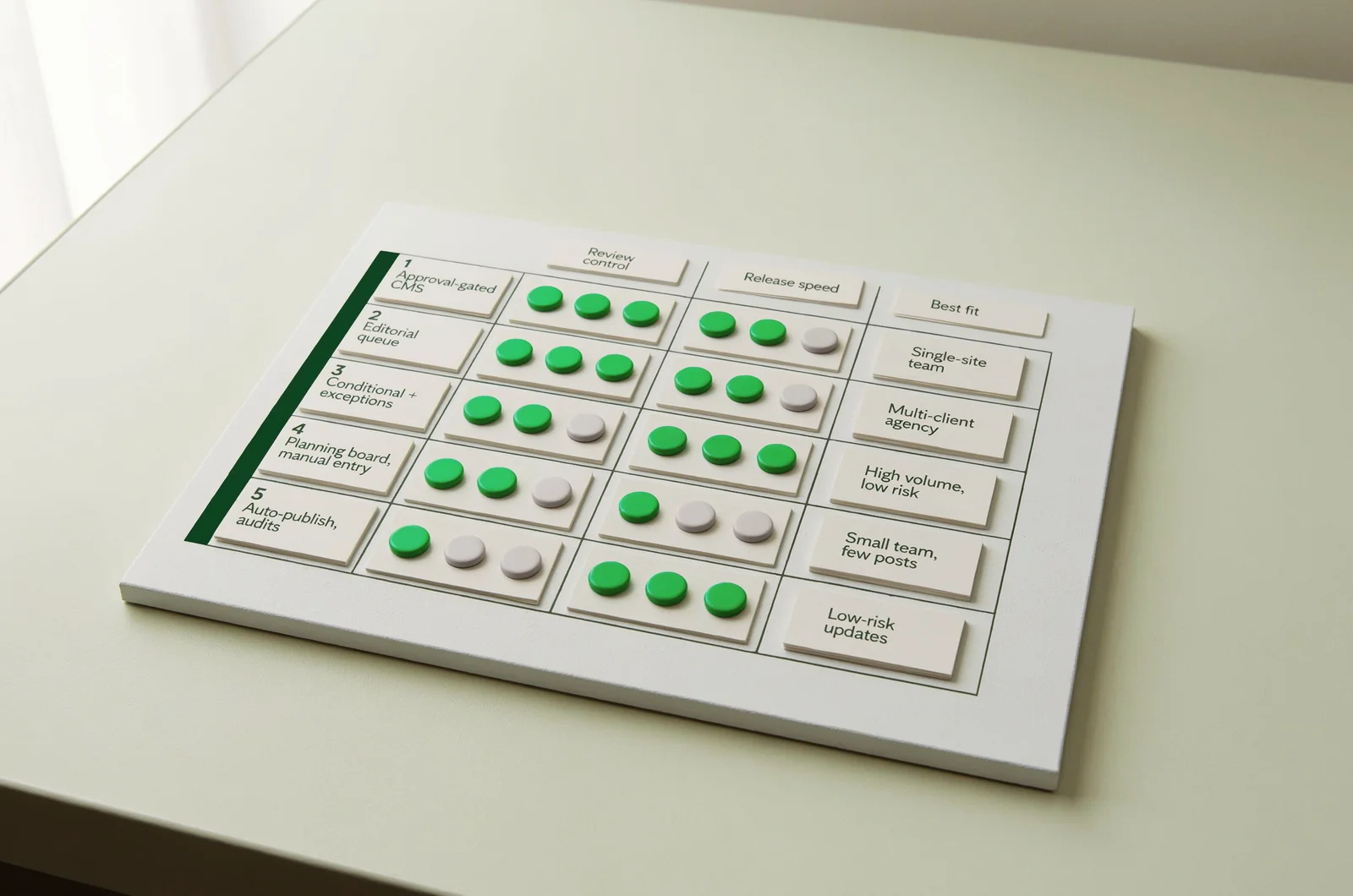
1. CMS scheduling with an explicit approval gate
This is the first configuration to consider when one editorial team owns a single website. Require a workflow in which an authorised reviewer approves the article before a scheduler can release it.
Its strongest design property is a short approval path: draft, review, approval and scheduled publication remain close to the destination. Budget for CMS permissions, workflow configuration and ongoing editorial time. Confirm whether the proposed subscription includes the roles you need.
The limitation is scope. If contributors, client approvals or several websites require separate coordination, assess whether the CMS can represent those responsibilities clearly.
For evidence, ask for a demonstration using your roles. Have a contributor attempt publication, then change an approved article and inspect its status. Check that both actions follow your policy.
Choose this setup when the CMS passes those tests and the team can manage its queue there. Require approval to attach to the exact version scheduled for release.
2. A dedicated editorial queue connected to the CMS
Prioritise a separate editorial workspace when several people or clients must approve content before release. Specify distinct responsibilities for briefing, factual review, client sign-off and publishing.
The standout requirement is visibility into ownership. Every waiting article should have a named approver and a clear reason it cannot advance. Budget for reviewer access, client accounts, integration maintenance and administration.
The main limitation is the handoff. Approval in one workspace must correspond to the content sent to the CMS. Establish which system owns the article and which owns its release status.
Request evidence of revision tracking, rejected approvals and destination mapping. Include two clients with different permissions in the demonstration. Ask what happens if someone edits the CMS copy directly after approval.
Choose this configuration when coordination across teams is the main constraint. Before purchase, require a reconciliation process that identifies differences between the approved version and the destination copy.
3. Conditional scheduling with an exception queue
Consider conditional automation after the team has defined which articles may proceed without individual approval. Suitable candidates should have a narrow scope, agreed evidence requirements and a repeatable structure.
Its standout requirement is selective release. Specify which conditions permit scheduling and which send an article to a reviewer. Budget for rule design, exception handling and periodic audits alongside software charges.
The limitation is the policy itself. A broad category such as “educational content” leaves too much room for interpretation. Define allowed subjects and escalation triggers precisely.
For evidence, submit drafts containing a changed product claim, an unsupported figure and a shift away from the approved search intent. Treat these as test cases. Observe whether the proposed configuration holds publication and records a reason.
Choose this setup only after the exception path works. Name the person responsible for held articles, and require publication to remain blocked when that person has not resolved the issue.
4. A shared planning board with manual CMS entry
Keep a planning board on the shortlist when volume is modest and one editor can own the complete release process. Specify the fields needed to connect each brief, draft, approval and destination URL.
The standout property is a workflow the team can inspect and revise before committing to deeper integration. Budget for coordination, copying content, checking formatting and recording publication outcomes.
Its limitation is reliance on individual execution. Decide how the team will detect a missed approval or a difference between the reviewed document and the published page.
Ask the proposed owner to demonstrate a complete release, including a revision and a reschedule. Inspect the records left behind. Another colleague should be able to identify what was approved and where it appeared.
Choose this configuration as a deliberate operating choice for a small queue. Write the release procedure down, assign a backup owner and record the final URL against the approved draft.
5. Direct automatic publishing with retrospective audits
Place unattended publishing last for a team still defining its editorial controls. Consider it for a bounded content category only after the release rules and recovery process have been demonstrated.
The standout design objective is publication without routine human scheduling. Budget for monitoring, audit samples, incident response and corrections. Request those costs alongside the subscription quote.
The limitation is the timing of inspection: retrospective review happens after release. Specify which claims or content categories always require approval beforehand.
For evidence, require a publication log, a pause control and a demonstrated correction process. Test an interrupted CMS request and inspect how the configuration prevents duplicate publication. Verify who receives failure notifications.
Choose this setup only when an owner accepts the defined release policy and can manage exceptions. Keep sensitive claims, customer commitments and substantial product changes behind mandatory review. Require a working pause mechanism before enabling unattended release.
Make approval survive edits and publishing failures
The difference between a useful review queue and a calendar becomes clearest when an approved article changes or a publication attempt fails. Include both situations in the buying decision.
Attach approval to the version that will publish
Specify the scope of approval: body copy, headline, metadata, images, links and destination. Then decide which changes require renewed review.
A practical policy might allow correction of a spelling error while requiring approval for a new numerical claim or revised product statement. Treat that as a policy proposal and adapt it to your subjects.
Require the system to preserve the approved version or show a reliable change history. Ask whether a scheduled article can receive a substantive edit without returning to review.
For an agency, identify whose approval matters at each stage. Client acceptance and editorial release permission may be separate decisions. Record both where the contract requires them.
Reconcile every publication attempt with the CMS
During evaluation, simulate a CMS timeout after a publication request. Ask the tool to establish whether the destination article exists before attempting publication again.
Specify observable outcomes: published successfully, held for investigation or failed with a recorded reason. Require the destination URL and publication status in the editorial record.
For teams operating across Spain and Portugal, verify the configured time zone for each site and its daylight-saving behaviour. Use explicit scheduled dates and times in the demonstration.
End the test by correcting or withdrawing a published draft. Confirm who can perform the action and how the queue records the result.
Price the work around each published page
Compare automated and manual workflows using the cost of an approved, correctly published page. Request subscription prices, reviewer charges and integration costs separately, then add the labour required to operate the proposed setup.
Consider a hypothetical team publishing 40 articles per month. If each article needs 12 minutes of review and three minutes of corrections, that is 600 minutes, or 10 hours. This is an illustration, not a productivity benchmark.
Extend the calculation to include rejected drafts, approval chasing, integration maintenance and post-publication repairs. Use the same accounting period and content requirements for every option.
The AI content cost comparison provides a separate cost discussion. For a purchase decision, replace illustrative assumptions with your team's recorded time and the supplier's written quote.
Divide total operating cost by pages that passed your release checks. Record failed or withdrawn articles separately so they remain visible.
If a SiaSEO proposal is under consideration, require the same breakdown of editorial work, CMS responsibilities and exception handling. Apply one cost model across the shortlist.
Run a pilot that can disqualify a tool
Use a small pilot to compare each configuration against your release policy. Agree on failure conditions before the demonstration.
- Select representative drafts. Include a routine article, a product-sensitive article and a draft that requires revision.
- Assign real roles. Use the proposed contributor, editor, client reviewer and publisher permissions.
- Change approved content. Alter a claim or destination and check whether renewed approval is required.
- Interrupt publication. Test a failed request, a retry and the handling of an uncertain destination status.
- Inspect the final page. Compare the published body, metadata, links and scheduled time with the approved version.
Record observations as passed, failed or unresolved. Do not turn an unresolved control into a positive score because another part of the demonstration looked persuasive.
An interactive workflow selector could help organise this decision. Inputs would include monthly volume, available review hours, content risk and required approvers. Its output should show a proposed release path and unresolved controls. High-risk categories should retain mandatory review regardless of spare capacity.
Prefer the least complex configuration that passes the pilot. If conditional automation fails the approval tests, retain approval before scheduling and revisit automation after the control is corrected.
Resolve responsibility before changing review levels
The final choice between scheduling automation and editorial queues needs an explicit owner for approval, exceptions and published corrections. Settle these questions before expanding release permissions.
Does manual review require manual scheduling?
Choose the two controls independently. A reviewer can approve a specific version and allow a scheduler to release it at the agreed time.
Require the scheduling permission to depend on the approval state. If the proposed tool cannot preserve that relationship, include a separate release check in the operating procedure. During the pilot, verify that an unapproved revision cannot inherit the earlier version's permission to publish.
When should a team replace full review with sampling?
Consider sampling only for a defined category after a pilot has produced acceptable results against your own criteria. Set the sample policy, escalation triggers and owner before changing review levels.
Avoid selecting a universal percentage without evidence from your workflow. Keep factual claims, product changes and other sensitive subjects under the required approval policy. Restore full review when the agreed failure conditions occur.
Who owns an article held by an automated check?
Assign a named editor or account owner, with a backup and an escalation route. The record should state why the article is held and what evidence is needed to release it.
Keep the scheduled publication time subordinate to that hold. If nobody resolves the exception, the article should remain unpublished. Test this behaviour with an overdue item before enabling automatic release for the category.