Getting Your Brand to Show Up in ChatGPT When Buyers Ask
A step-by-step method for getting your brand to show up in ChatGPT answers when B2B buyers ask for tools, agencies, or vendors in your category.

For B2B teams, showing up in AI search results means earning a place in answers to questions a prospective customer would actually ask. Build your work around that outcome: select buyer prompts, record a baseline, clarify your brand’s public information, improve the relevant pages, then repeat the checks. This walkthrough gives you a controlled way to assess progress in ChatGPT without treating a single favourable answer as proof that your changes worked.
Define the buyer answer you want to earn
Set a specific goal for your brand’s appearance before editing any content. Choose a buyer, a purchase situation and a supported reason for inclusion.
For example, imagine a workflow software company targeting UK agencies that need client approval controls. Its goal might be accurate inclusion in answers about managing client approvals. Keep that separate from appearing in a broad software shortlist.
Arrange access to your website’s content, technical settings and editable business profiles. Bring a record of approved product claims, customer evidence and existing search reporting. Assign someone to approve factual changes.
Use three separate success checks:
- Record whether the response names your brand.
- Record whether it links to your website or another page about your brand.
- Check whether its description matches the product and buyer requirement.
Treat these as distinct outcomes. A mention with an incorrect capability should fail your accuracy check.
Keep the scope narrow enough to investigate. Begin with one product category and one buyer segment. Use B2B SEO fundamentals to connect this work with your wider search programme.
1. Record how ChatGPT answers your buyer prompts
Create a fixed prompt set before changing your website. This gives you something concrete to compare against later.
Choose prompts without supplying your brand
Write ten questions that reflect genuine purchase constraints. Draw their wording from sales enquiries, customer interviews or search data you already hold.
For the hypothetical agency software company, suitable prompts could include:
- Which workflow platforms suit UK agencies that need clients to approve work?
- What should an agency compare when choosing software for client approvals?
- Which tools support approval workflows across several client accounts?
Only include requirements your product actually supports. Avoid inserting your brand into these discovery questions, because that changes the task you are measuring.
Use long tail keyword priorities when narrowing broad category questions into specific buying situations. Keep the final wording unchanged throughout the first measurement cycle.
Save enough context to repeat the check
Run each prompt three times in fresh conversations. That creates a proposed baseline of thirty responses, rather than a claim about typical performance.
Record the date, exact prompt, displayed model or mode, relevant settings, response text and linked sources. Note any prior conversation context. Where a search option is available, record its state and keep different modes in separate datasets.
Save the complete answer, including omissions and factual errors. A screenshot alone may make later comparison awkward, so retain text as well.
Run a separate branded diagnostic question asking what your company does. Keep that result outside the discovery baseline. Finish this step with thirty saved discovery responses and a separate list of description errors.
2. Make your brand’s identity consistent across public pages
Give each buyer a clear, consistent account of what your company does. Start with the homepage, about page, main product pages and relevant third-party profiles.
Create a short reference document containing your preferred brand name, product category, intended customers and supported capabilities. Include important limitations. Use existing evidence to resolve disagreements between pages.
For the hypothetical workflow company, distinguish internal task approval from external client approval. If the product supports only the former, remove wording that implies the latter.
Check for:
- Old product names presented as current names.
- Different category descriptions across important pages.
- Customer segments named without supporting examples.
- Capabilities described more broadly than the product allows.
- Profile descriptions that still reflect an earlier business model.
Correct material differences while preserving useful historical context. Where an old name remains relevant, explain its relationship to the current brand.
Keep prose natural. Consistency does not require copying the same paragraph into every profile. The category, audience and capabilities should agree even when the wording changes.
Ask a colleague unfamiliar with the project to describe the company using only those public pages. Compare their description with the approved reference document. Resolve substantive differences before producing more content, then record the owner and review date for each corrected page.
3. Check whether the buyer pages are publicly accessible
Inspect the pages you want buyers and search systems to encounter. Establish what is accessible before spending time rewriting it.
Open each priority URL while signed out. Check that the main explanation appears without an account, that the page loads successfully and that navigation reaches it.
Have the technical owner review response codes, canonical URLs, indexing directives, robots rules and sitemap inclusion against the site’s intended configuration. Record findings for each page rather than assuming one setting applies everywhere.
Keep access restrictions around customer information, private documentation and account areas. Review their purpose before changing them.
For a public product or use-case page, inspect the rendered content and the page text available to your technical checks. Confirm that the description, supported capabilities and relevant evidence are present.
If a priority page redirects elsewhere, record the destination and check whether it still answers the buyer’s question. If several URLs describe the same use case, identify which page should carry the maintained explanation before consolidating anything.
The expected result is a documented route to the intended content. Public accessibility alone does not demonstrate inclusion in a ChatGPT answer. Complete this step with a list of accessible pages, unresolved access issues and the person responsible for each fix.
4. Rewrite priority pages around the buyer’s actual question
Improve the page that best matches each prompt cluster. Give the reader a direct answer, followed by the evidence needed to assess it.
Put the answer beside its conditions
Choose a heading based on a real buyer question. Under it, write a short explanation that names the product, the relevant capability and its limits.
For the hypothetical workflow company, a section about external approvals might explain who can review work, what they can approve and which account conditions apply. Verify every detail before publication.
Avoid opening with a broad claim about transforming collaboration. Supply information the buyer can check:
- State the task the product supports.
- Explain the relevant workflow.
- Name restrictions that affect suitability.
- Place supporting documentation or customer evidence beside the claim.
Keep the explanation understandable when read on its own. Replace vague references such as “this capability” with the actual capability where the surrounding context could be lost.
Attach evidence to the claim it supports
Add dated screenshots, maintained documentation or approved customer examples where available. Describe exactly what each item establishes.
If a customer example concerns internal approvals, keep its claims within that scope. Do not stretch it into evidence for external client approvals.
Use content optimisation tools to support editorial review where useful. Retain human responsibility for whether the page’s claims are true.
If you use SiaSEO for site-aware drafting, compare each draft against the approved brand reference and product evidence before publication. Review category descriptions, capability claims and limitations separately from style.
Finish by asking a reviewer to answer the original buyer question using only the revised section. If they need another page to interpret a material claim, add the missing condition or a relevant link.
5. Seek corroboration from sources present in your baseline
Use the sources recorded in your ChatGPT responses to choose where to investigate third-party coverage. Treat those observations as evidence about your sample, without assuming they establish a universal source preference.
Group the linked pages by purpose: product documentation, comparison articles, customer accounts, professional directories or editorial coverage. Examine whether each page genuinely addresses your buyer’s question.
For relevant pages, identify a legitimate contribution your company can make. That might be correcting outdated information, supplying verifiable product details or providing an approved customer example.
Prioritise editorial relevance. A page about agency approval workflows is a more coherent outreach target for the hypothetical company than an unrelated high-traffic publication.
Keep an outreach record with the page, its relevance, the factual contribution and the outcome. Preserve the publisher’s control over its wording and inclusion decisions.
Avoid manufacturing customer commentary or presenting sponsored coverage as independent evidence. Keep commercial relationships clear in your own records and supplied materials.
Do not reproduce instructions aimed at influencing an AI system inside public copy. Write information that helps a person assess the product.
The expected result is accurate, relevant third-party information you can verify on the published page. Revisit each successful correction or contribution and check the live wording. Record the publication date, supporting claim and URL for your next comparison.
6. Repeat the checks and separate progress from attribution
Rerun the original prompt set after your changes are live. Keep the testing conditions as close to the baseline as your available controls allow.
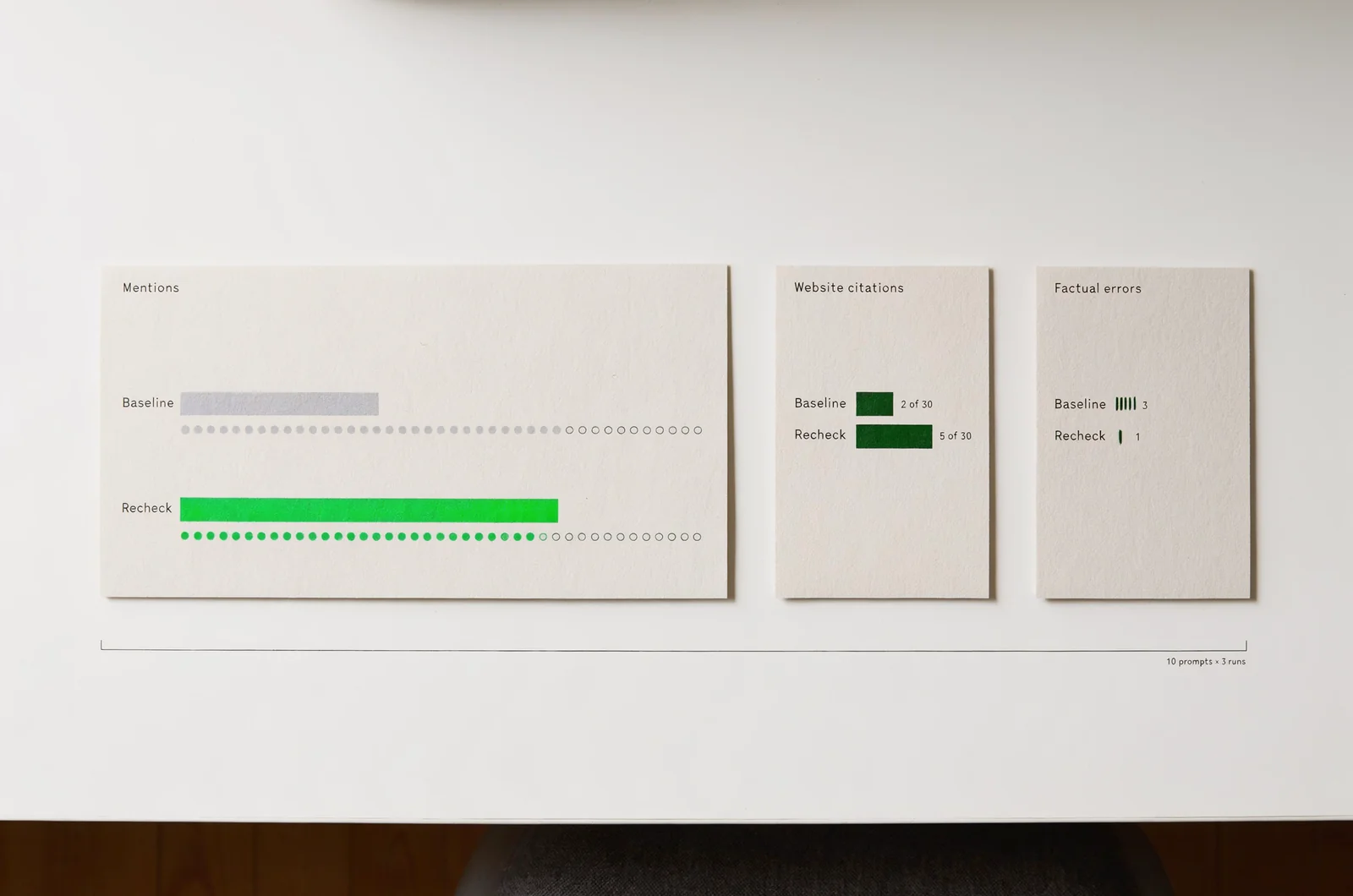
Compare mentions, citations and accuracy separately
Repeat the three runs for each of the ten prompts. Use the same scoring rules and save the full responses again.
Calculate mention frequency as responses containing your brand divided by completed responses. Calculate website citation frequency separately. Track factual errors as their own count.
For illustration, a hypothetical change from four mentions in thirty responses to nine in thirty would show more mentions in that sample. It would leave open the question of what caused the difference.
Record whether the additional mentions describe the right use case. Review any cited pages to see whether they support the accompanying statement.
Avoid combining branded diagnostic prompts with unbranded discovery prompts. Keep the denominator consistent. Log failed runs and complete their replacements under the same conditions.
A small interactive prompt log could calculate these frequencies, preserve page-version dates and flag inaccurate descriptions for review. Keep its output tied to saved responses.
Use the evidence to choose the next edit
Maintain a change log beside the prompt results. Include changed URLs, publication dates, technical corrections and third-party updates.
Use the observed pattern to choose a focused follow-up:
- If the description is wrong, revisit the pages containing the conflicting claim.
- If a relevant page remains inaccessible, resolve that issue before another rewrite.
- If competitors appear for a requirement you do not support, reconsider that prompt’s fit.
- If mentions rise but descriptions remain inaccurate, prioritise correction over broader coverage.
For articles published through SiaSEO, retain a record of the reviewed draft, published version and subsequent factual edits. Use that record when comparing the dates of content changes with response observations.
Continue measuring website referrals and qualified enquiries alongside answer visibility. Record those as separate business outcomes, and assign the next action to a named owner with a review date.
Questions that change your ChatGPT visibility checks
Use these questions to settle reporting and scope decisions before extending the programme.
How long should you wait before checking again?
Set a review interval that fits your publishing cycle and document it in advance. Treat any interval you choose as an operating decision. Avoid promising a response date for systems you do not control.
Check the changed pages immediately after publication, then rerun the saved prompts on the scheduled review date.
Does a citation mean ChatGPT recommends your company?
Use separate reporting categories. Score a citation when the response links to a page. Score a recommendation only when the answer presents the company as a suitable choice for the stated requirement.
Retain the surrounding sentence so another reviewer can check your interpretation.
Should you publish a page for every prompt?
Group prompts by the buyer decision they represent. Use one maintained page where several questions concern the same use case.
Create a separate page when you can identify a distinct task, supply relevant evidence and explain how its purpose differs from existing pages.
What should you report if nothing changes?
Report the unchanged result with the prompt count, testing conditions, completed edits and unresolved issues. Select the next investigation from that record. Keep the original baseline available for the next review.